2013
11/05
Retronyms Tabletop 2 For iPad
Author View comments Tags Tags: , , , ,
Tabletop Music Workstation For iPad

Tabletop Music Workstation For iPad

This free update adds support for the new inter-app audio protocol in iOS 7. This allows you to route audio and control data between apps on your device. Use the free Mastermind to control compatible apps. Purchase Zignal to record audio from compatible apps straight into your Tabletop session.

We’ve also updated to AudioCopy 2.0. AudioCopy makes it easy to paste sound from compatible apps. The new AudioCopy ensures compatibility with iOS 7, and includes updated UI and other improvements (more info at retronyms.com/audiocopy/).

What’s New in Version 2.2
Tabletop 2.2 adds two new devices with support for inter-app audio. One is a free controller for midi-controllable apps, and the other is an inter-app audio recorder that can capture the audio produced by other apps. This update also adds support for AudioCopy 2.0. Finally, it adds several bugfixes and iOS 7 enhancements.

————————————————
About Tabletop

An Expandable Studio with 14 included musical devices.

Tabletop is a modular environment where you can mix and match different devices. Select from over 40 devices including samplers, mixers, effects, sequencers and more. Buy only the gear you need from an expanding catalog.

Virtual, Modular Gear.
Plug the output of a keyboard into a delay to add an echo, or wire it up to a mixer and adjust the pan. Chain up multiple effects to create new and evolving sounds. Tabletop is an audio playground where you can create beats, compose songs, mix live, make mashups with samples from your iPod library, and more… the possibilities are wide open.

• 43 devices including effects, sequencers, drum machines, and synths.
• 14 devices are included for free.
• Access powerful Tabletop-Ready Apps including iMPC and iMini.
• Piano Roll style timeline editor.
• Cut, copy, paste, duplicate, and create notes.
• Correct note timing with Fix to Grid.
• Edit note length and velocity.
• Undo changes and edits with Tabletop’s History Menu.
• Features Core MIDI Support.
• Works with any MIDI-compatible hardware.
• Control Tabletop’s keyboards, drum pads, knobs, faders, and other parameters.
• Customize control mapping with Midi Learn mode.
• Connect multiple devices.
• Share your music on CloudSeeder with a thriving community (powered by SoundCloud).
• Download and remix sessions from other CloudSeeder users.
• Much more under the hood.

Tabletop is available for FREE

2013
10/24
UPDATE: ReBirth Ver 1 4 1
Author View comments Tags Tags: , , , ,

Rebirth For iPad

ReBirth is back! Propellerhead Software’s legendary Techno Micro Composer has been resurrected and customized for the iPad. ReBirth faithfully emulates dance music’s three backbone devices: The Roland TB-303 Bass synth and the Roland TR-808 and 909 drum machines. Combine these with FX units, fully featured pattern sequencers and a gorgeous-looking interface and you’re ready to make killer tracks on your iPad. Share your music with friends on Facebook, Twitter and more using the built in sharing features.

What’s New in Version 1.4.1
Version 1.4.1
• Audiobus update
• AudioCopy 2.0

Version 1.4
• Mail a song to a friend
• Send songs to other apps with file capabilities
• Backup and restore your songs in iTunes File Sharing

Features
2 x TB-303 Bassline Synthesizer with pattern sequencer
The original Acid House and Techno bass synth. Unrivaled power, unmistakable sound.

TR-808 Drum machine
Roland’s sub-heavy 1980 beat computer. Instant hip-hop.

TR-909 Drum machine
The go-to beatbox for everything House and Techno. Press play and you’re dancing.

Tempo-synced digital delay
Bouncy and hypnotic, always in time with your music.

Compressor with threshold and ratio
A bare-bones compression unit for added beefiness.

Distortion unit with amount and shape
Raw and rugged distortion for that extra edge. Works wonders with any 303 bassline.

PCF effect
Pattern controlled Low-pass / Band-pass filter – a tweaker’s delight.

Mixer
Device specific mixer sections with pan, delay sends and FX switches

Mod support
Includes 7 original user mods with alternative sound sets and graphics

Sharing features
Share function with easy publication of songs to Facebook, Twitter and other social networks.

ReBirth is available for $14.99.

2013
10/24
Super Drummer Boy for iPhone
Author View comments Tags Tags: , , ,

Super-Drummer-Boy

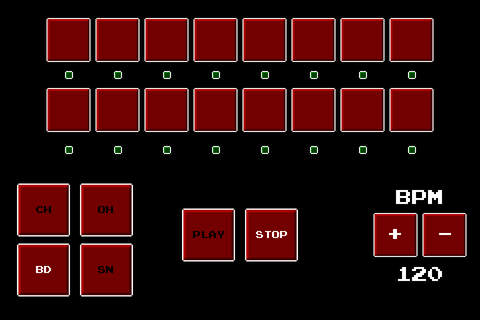
Super Drummer Boy is a simple IOS drum machine with 8-bit drum sounds. Features a 16 step sequencer, 4 drum parts, and modifiable tempo.

Super Drummer Boy Screen

Super Drummer Boy is available for FREE.

2013
10/23
Garageband 2 for iOS
Author View comments Tags Tags: , , , , ,

Garageband 2 For iOS

GarageBand turns your iPad, iPhone, and iPod touch into a collection of Touch Instruments and a full-featured recording studio — so you can make music anywhere you go. Use Multi-Touch gestures to play a piano, organ, guitar, and drums. They sound and play like their counterparts, but let you do things you could never do on a real instrument. Enjoy Smart Instruments that make you sound like a pro — even if you’ve never played a note before. Plug an electric guitar into your iPad, iPhone, or iPod touch and play through classic amps and stompbox effects.* Use a Touch Instrument, a built-in microphone, or a guitar and instantly record a performance. GarageBand now takes song creation to the next level with support for up to 32 tracks.** Get even more sounds for GarageBand with a one-time in-app purchase or record popular third-party music apps using Inter-App Audio in iOS 7. And share your song using email, Facebook, YouTube, SoundCloud, or AirDrop for iOS.

What’s New in Version 2.0
• All-new streamlined design
• Create a song with up to 32 tracks* using Touch Instruments, audio recordings, and loops
• Record compatible Third-Party music apps using Inter-App Audio in iOS 7
• Drag and drop audio recordings to create Sampler instruments
• Support for AirDrop in iOS 7
• 64-bit support

3D Touch

Garageband Screenshot

* Requires devices with the A7 chip.16 tracks available on iPhone 5c, iPhone 5, iPhone 4s, iPad (4th generation), iPad (3rd generation), iPad 2, iPad mini, and iPod touch (5th generation)

Garageband 2.0 is available for $4.99

2013
09/28
Collaborative music studio for iPad
Author View comments Tags Tags: , , , , , ,

Cotracks

Cotracks is a collaborative music studio for teamwork on a single iPad. With Cotracks you can create multiple layers of loops and phrases using multiple instruments. Cotracks is designed to maintain your creative flow and is always ready to capture your ideas, regardless whether you are flying solo or collaborating with others.

Collaboration is where Cotracks really stands out. Everyone in your session has the ability to play and record at will without disrupting or being disrupted by the workflow of others. This lets you lay down the foundation of a tune within minutes and makes Cotracks the perfect and inspiring tool for brainstorming new ideas within a group.

The loops you create may be exported as separate audio clips or as a mixdown audio clip which you may then import and use in any audio software supporting the common wave audio format.

DESIGNED FOR VARYING NUMBER OF USERS

You can start off creating music in a single user mode. Later when your friend decides to join in, you switch to a two user mode. The interface layout will adjust enabling convenient access to the application from both sides of the table. Whenever another friend happens to join you, the layout will adjust again enabling access from all four sides of the device, letting you team up with up to three friends for a super creative music session. Whenever one or more members leave the session, it is as easy as a single tap to switch back to the smaller team or to the single user mode, letting the remaining members continue from where the others left off.

DESIGNED FOR VARIABLY SKILLED USERS

Cotracks offers lots of fun at the same time for both novice and advanced musicians with the help of scale based keyboard, flexible quantize, sequence sharing and editing capabilities. For example, a novice musician may grab a copy of a complicated sequence played by a more experienced friend and edit the instrument, sound and effects, record modulation controllers over the sequence and tweak the various playback parameters including key and scale. Essentially creating something new and exiting without necessarily playing a single note. Cotracks is all about giving everybody the means to contribute, which takes the concept of music collaboration to a new level.

It’s like playing with a band, but this time you can record and play back your own parts, in perfect sync with others, and create the constituents for a great track at the same time. With Cotracks the whole is greater than the sum of its parts.

FEATURES

MULTITRACK SEQUENCER
• up to 12 instrument tracks
• beat synchronized playback and recording

INTERFACE
• comfortable access for multiple users
• instruments may be arranged in multiple orientations
• dedicated interface modes for single user, two users and four users
• switch between interface modes with a single tap
• access four instruments simultaneously
• independent playback control constantly available for each instrument
• keys and ribbon controllers for synthesizers
• Futucraft’s dynamic beat synced repeater control
• repeater lets you play and record complex beat synced rhythmic textures
• XY-modulation control

EDITING
• nondestructive quantize and transpose
• change the playback scale of recorded sequences
• drag and drop copying of sequences between instruments

INSTRUMENTS
• polyphonic synthesizer with dozens of high quality instrument presets
• monophonic bass/lead synthesizer with dozens of high quality instrument presets
• sample player with a library of professional quality samples from Inspire Audio
• programmable XY-modulation
• band-limited oscillators to ensure professional grade sound quality

FX
• stereo delay
• stereo phaser
• 2 equalizer units
• dedicated units for each track

FILE
• export each instrument to separate audio clip
• export all in one audio mixdown clip
• export and import sessions via iTunes in XML format for backup and sharing

SUPPORT
• on-screen help and tips
• online support integrated in app
• video tutorials

Cotracks is available for $4.99

  • iPad Loops is an iOS music production blog dedicated to exposing the best iPad apps musicians, producers, and Djs. This is not a database of every app. It is, however, one of useful recommendations from someone with many years in music production. I try to update it on a daily basis (ok sometimes every two days) and I do my best to post useful apps only. My name is Jason Donnelly (Dj Puzzle). Some of the apps that contain my sounds are Synth One, EG Segments, Hammerhead, Retronyms AudioCopy, Audio Evolution Mobile, and iMPC Pro. My work is published by Roland, Antares, Magix, Soundtrack Loops, Sample Logic, Acoustica, Native Instruments, The Grammt Museum and many more. Subscribe to our RSS feed below to get updated when new apps are posted.
    As an Amazon Associate I earn from qualifying purchases.
  • SUBSCRIBE:

  • FOLLOW ON YouTube

    FOLLOW ON Reddit

    iPadLoops RSS Feed

    Instagram
  • Categories

  • Recent Posts

  • Tags

  • Archives