2017
08/22
Korg Mono Poly For iOS
Author View comments Tags Tags: , , , , , , , , , ,

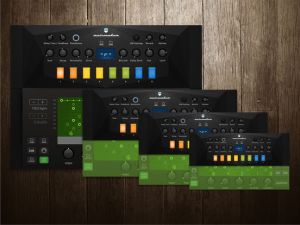
Reviving a classic KORG analog synthesizer.The iconic 4VCO synthesizer, reborn on iOS. The Mono/Poly analog synthesizer appeared in 1981 at the same time as the acclaimed Polysix. Not only was it a fat-sounding four-VCO monophonic synthesizer, it featured a revolutionary design that allowed it to also be used as a four-voice polyphonic synthesizer, which helped cement its legendary status.

The long-awaited “KORG iMono/Poly” iPad/iPhone app completely reproduces all features of the original Mono/Poly. Four VCOs and a rich array of modulation allow a wide range of detailed sound design. New functionality such as two multi-effects units and eight virtual patches are also provided. In addition, the seamless integration that you expect from KORG’s iOS apps will fit perfectly into your music making process. The Mono/Poly has been reborn for today’s world, bringing you a unique and legendary sound.

* Due to differences in CPU speed of iPads / iPhones, iPad 3rd gen/2/iPad mini/iPhone 4s are not supported, only iPad Air/iPhone 5s or later is recommended.

[ Features ]

• Deep 4VCO sound. A complete reproduction of the classic Mono/Poly
The Mono/Poly synthesizer featured four VCOs, a dedicated envelope generator for the VCF, and also sync and cross-modulation, earning it a reputation for its detailed sound-shaping potential and its distinctive character.

• Powerful virtual patches, and the latest presets to catch the scene
Eight virtual patches provide the ultimate expansion of the Mono/Poly’s distinctive sound-design potential. Two multi-effect units are also provided, allowing you to create complex and broad-ranging sounds with complete freedom.

• Quick access to all panels
Although iMono/Poly provides a vast number of parameters, it’s designed with a screen structure that provides quick and seamless access to all of them. With a single tap, you can rotate between the main synth & key assign screen and the virtual patch & effect screen. There’s no need to open individual screens for specific functions, or to move back and forth between them.

• Produce music in conjunction with KORG Gadget
iMono/Poly can be used in conjunction with “KORG Gadget,” the music production DAW app that has won numerous prizes within Japan and around the world. When you install both apps, iMono/Poly appears as the “Montpellier” gadget within KORG Gadget.

Get KORG iMono/Poly

2017
08/21
Ruismaker FM Ver 2 With Sequencer
Author View comments Tags Tags: , , , , , , ,

Here comes the the crazy twin-sister of Ruismaker, designed for people who want to design their own percussion sounds from scratch. Ruismaker FM’s simple, yet flexible synthesis engine lets you create anything from snaredrums, kickdrums and spacy toms to weird and unconventional percussive sounds and effects. Ruismaker FM is a unique drumsynth plugin (i.e. it does not use samples), which is coupled with a creative Euclidean sequencer when run in standalone mode.

What’s New in Version 2.0
Completely overhauled the app:
– added a cool standalone Euclidean sequencer mode (with Ableton Link, MIDI Clock, WAV export etc.)
– upgraded the synth engine
– added a preset manager to the AU plugin
– many more little touches and improvements!

The plugin is fully AUv3 (Audio Unit Extension) compatible:
– Audio Unit Instrument: making music on iOS doesn’t get more convenient
– Each sound is modeled using authentic analog and FM algorithms;
– Comes with dozens of unique customizable models
– Does not use any samples; all sounds are synthesized in realtime, on the fly
– Light on the CPU, so you can run lots of Ruismaker FMs simultaneously
– Fully automatable parameters (requires host support) and MIDI CC controllable
– Has its own preset manager

The standalone sequencer is refreshingly different:
– Program patterns using Euclidean algorithms
– Powerful random feature and mutation probability settings per channel
– Syncs with Ableton Link or MIDI Clock
– Exports WAV and MIDI
– Compatible with Audiobus 3 (including MIDI IN/OUT mode)

Get Ruismaker FM

2017
08/21
Ruismaker Ver 2 Includes Sequencer
Author View comments Tags Tags: , , , , , ,

Ruismaker is a unique drumsynth plugin (i.e. it does not use samples), which is coupled with a creative Euclidean sequencer when run in standalone mode.

What’s New in Version 2.0
Completely overhauled the app:
– added a cool standalone Euclidean sequencer mode (with Ableton Link, MIDI Clock, WAV export etc.)
– upgraded the synth engine
– added a preset manager to the AU plugin
– many more little touches and improvements!

The plugin is fully AUv3 (Audio Unit Extension) compatible:
– Audio Unit Instrument: making music on iOS doesn’t get more convenient
– Each sound is modeled using authentic analog and FM algorithms;
– Comes with dozens of unique customizable models
– Does not use any samples; all sounds are synthesized in realtime, on the fly
– Emulates analog components, introducing subtle, natural fluctuations in the sound
– Light on the CPU, so you can run lots of Ruismakers simultaneously
– Fully automatable parameters (requires host support) and MIDI CC controllable
– Has its own preset manager

The standalone sequencer is refreshingly different:
– Program patterns using Euclidean algorithms
– Powerful random feature and mutation probability settings per channel
– Syncs with Ableton Link or MIDI Clock
– Exports WAV and MIDI
– Compatible with Audiobus 3 (including MIDI IN/OUT mode)

Get Ruismaker

2017
08/20
Roli Noise Hip Hop Jam
Author View comments Tags Tags: , , , , , ,

NOISE is a free app that makes music mobile, so you can play and learn music anywhere you take your connected device. Using simple, easy-to-learn gestures, you can create beats, melodies, and songs with a huge library of sounds. Play NOISE on your phone or tablet, and extend its musical powers by pairing NOISE with ROLI BLOCKS, the modular music studio. NOISE was developed by music technology pioneer ROLI.

What’s New in Version 2.5.1
Introducing Mixing!
– Control the level of your tracks on screen or turn your Lightpad into a bank of faders
– Access the mixer by tapping on the Volume icon whilst in the song view or configure your Lightpad in My Studio

Bug Fixes:
– Synth presets could be pitched up if iDevice changes sample rate
– Occasionally synth presets would be silent when running other apps in the background
– Clips could get deleted when using the undo button

A NEW APPROACH TO MAKING MUSIC
Your touch screen becomes a real musical instrument with NOISE, which lets you shape sounds by drumming the screen, gliding your fingers along it, pressing into it, and lifting off. You make music through intuitive gestures on a grid of colorful pads. Each pad is a particular instrument or a note in a scale.

AN INSTRUMENT AND A STUDIO IN ONE
NOISE makes you both a performer and a producer. Start by choosing from custom-made sounds that range from bongo drums to string sections to zithers. Shape those sounds into beats and melodies, and record them as loops. Then mix and match these loops and build amazingly multi-layered songs.

DESIGNED FOR LEARNERS
If you love listening to music but don’t think you can play an instrument, NOISE may change your mind. It’s a fun, interactive learning tool. In Learn Mode, just trace illuminated Light Trails to learn how to shape beats and melodies. Choose from one of 15 scales, and the notes of that scale light up on the grid. Turn on Hide Mode to always stay in tune — it hides notes that not in the key. Use Snap Mode to stay in time — it snaps your performance to the tempo.

Get Roli Noise (free)

ROLI BLOCKS TAKES YOUR MUSIC TO THE NEXT LEVEL

BUY ROLI Lightpad Block

The power of NOISE expands when you connect to ROLI BLOCKS, the modular music studio. Pairing wirelessly, NOISE becomes the sound engine for Lightpad Block and Seaboard Block. Learn more about BLOCKS on ROLI.com. On the pressure-sensitive surfaces of these Blocks, you can shape sounds and play songs in a way that is similar to the experience of playing NOISE on an iPhone or an iPad. But you can be even more expressive.

2017
08/17
DM2 Update Adds Drone Machine
Author View comments Tags Tags: , , , , ,

DM2 is a synthesis-based drum machine with a dedicated graphic editor, for the creation and manipulation of sound. DM2 is fully MIDI-mappable with more than 130 assignable parameters that can be controlled by an external MIDI controller.

What’s New in Version 1.6
Introducing the “DRONE MACHINE”. With the brand new “Drone Machine” mode DM2 turns into an instant Ambient machine. All 9 tracks play continuously regardless of what the sequencer plays. Switch it on and drive a powerful Dream Machine at the tips of your fingers. Extremely versatile when used with a MIDI controller and MIDI Learn mode. Dark Ambient admirers, Space Rock lovers, Dream Music adorers, Minimal fetishist are welcome.

** AMENDED**
+ AUDIO ENGINE : Improved CPU management when idle in the background
+ Faster loading time

A BIG, BIG STEP SEQUENCER. 16 or 32 step patterns. Or why not 7 or 25 steps? Or even polymetric tracks (poly what? no worries, just a fancy word for complex rhythms, yet super easy to make). And while we are at it, steps can also be singles, duplets, triplets or quadruplets for even sophisticated rhythms. Again it is all about drawing funny objects to make funky beats.

THE DRUMS PAGE. Where the sonic magic happens. Six touchable graphs to create sounds. Oscillators, LFOs, filters, noise generators, all the usual suspects in a drawable interface. This may look a tiny bit daunting at first, but the beauty is that whatever you touch, you’re not going to break anything. So give everything a whirl, and get experimental. And if you need some inspiration, DM2 contains plenty of ready-made sounds too.

THE PADS PAGE. Maybe you prefer finger-drumming? Sure, go ahead. Press REC and record your rhythms. Of course, there is an automatic quantize function, so that you’ll never miss a beat again.

THE MIXER PAGE. Big and beautiful, it will transform your iPad into a professional mixing desk for the price of a magazine.

THE FX SECTION. A powerful Effect processor. Just switch everything on and see where it takes you.

THE SONG PAGE. Last but not least, put all your hard work in the previous pages together in a shiny song.

Get DM2

  • iPad Loops is an iOS music production blog dedicated to exposing the best iPad apps musicians, producers, and Djs. This is not a database of every app. It is, however, one of useful recommendations from someone with many years in music production. I try to update it on a daily basis (ok sometimes every two days) and I do my best to post useful apps only. My name is Jason Donnelly (Dj Puzzle). Some of the apps that contain my sounds are Synth One, EG Segments, Hammerhead, Retronyms AudioCopy, Audio Evolution Mobile, and iMPC Pro. My work is published by Roland, Antares, Magix, Soundtrack Loops, Sample Logic, Acoustica, Native Instruments, The Grammt Museum and many more. Subscribe to our RSS feed below to get updated when new apps are posted.
    As an Amazon Associate I earn from qualifying purchases.
  • SUBSCRIBE:

  • FOLLOW ON YouTube

    FOLLOW ON Reddit

    iPadLoops RSS Feed

    Instagram
  • Categories

  • Recent Posts

  • Tags

  • Archives