2015
12/24
Midisteps MIDI Sequencer Supports AU Audio Units
Author View comments Tags Tags: , , , , , ,

midiSTEPs

As of today (the day I’m posting this) Midisteps is the second app to host AU Audio Unit extensions. One advantage using AU instead of Coremidi is that with AU you can use multiple instances of an AU app for example in this case you can get up to four iSEM synths running at once!

midiSTEPs is a powerful and fun MIDI step sequencer app that sends MIDI note and CC messages to other music apps and external synthesizers. It was designed to be super easy to use in a way that’s similar to the SH-101 sequencer, where you can just quickly enter a few keyboard notes and you’re ready to hit play and hear your sequence. At the same time, it also incorporates many ideas from other classic and modern sequencers, allowing you to set control values per step, mute and skip existing steps, switch between multiple patterns and parts, sync and link patterns in various ways, and modify your sequences.

midiSTEPs was designed from the ground up as a touch-based iPad sequencer app, so it’s super easy and intuitive to enter, edit and play sequences.

What’s New in Version 1.1

New:
Set random trigger probability, per step
Set randomization of velocity and length of notes, per part
Keyboard can be limited to a major or minor scale
Keyboard goes two octaves lower
Auto-hold option for press step screen, set in Settings app
Audiobus

Bonus feature: AU Extension hosting!

iSem and Midisteps Audio Unit

Please note:
– this is an experimental feature for a new iOS 9 API, keep expectations in check
– that said, it’s a whole lot of fun…
– there is currently only one released synthesizer AU Extension, iSEM
– you can run multiple instances of iSEM within midiSTEPs, automate parameters per step, and more
– AU extension effects are not currently supported, just synths
– certain things can sometimes cause clicks with iSEM: fast runs of notes, ties with some patches, etc
– if using multiple AU parts, use the audio mixer popup to lower individual parts and overall volume to avoid clipping
– experiment with audio buffer size, other AU extensions when they’re released, recording via AB and let me know what works and what doesn’t
– this is a step towards the future but it’s not ready for your live set yet… experiment in your spare time and have fun

Legacy midiSTEPs features:
64 step sequencer based on the classic SH-101 sequencer
Set note, chord or rest per step
Set accent and tie per step
Set CC, velocity, length parameters per step
Mute and skip individual steps
Set start and end points within sequence
Edit individual steps
Transpose, loop or one shot, start and pattern sync options
Four independent sequencer parts with 16 patterns each per set
Parts can have different speeds, lengths, sync and trigger options
Pattern Mix page with clip-launcher style pattern triggering
External MIDI clock sync with clock shift adjustments and swing
Easy to set up CoreMIDI configuration and MIDI mapping
Easy to use touch interface designed specifically for iPad

midiSTEPs

2015
12/22
Modstep all in one MIDI sequencer and controller
Author View comments Tags Tags: , , , , , , , ,

ModStep

Introducing Modstep, Modulation Monster and the first full-blown MIDI sequencer for the iPad. Modstep allows you to create music and jam with your iPad and your favorite IAA Apps, Mac and PC software and MIDI hardware as well as the internal drum sampler and synth. Use it as the centerpiece of your setup to create and perform music on the go, in the studio and on stage.

ModStep

FEATURES:
-Full-blown MIDI sequencer with Step Sequencer and Piano Roll
-Unlimited MIDI tracks
-Audio and MIDI streaming directly via charger cable to Mac and PC using studiomux technology
-Up to 128 MIDI CCs per Track can be modulated
-Built-in drum sampler with filter, delay and reverb, fully modulateable
-Built-in synthesizer with filter, delay and reverb, fully modulateable
-Templates to control external MIDI hardware
-Template editor to create your own templates for IAA Apps, desktop Apps and external MIDI devices
-Supports all MIDI interfaces for the iPad
-Core functionality controllable via external MIDI controllers
-Works on all iPads (iPad 1 restricted to MIDI only)
-Trigger out
-Integrated IAA mixer
-Step Sequencer with active steps
-Use third party IAAs as instruments and effects within one app

Requirements:
iOS 8 or later

Modstep

2015
12/22
Kirnu Cream For iPad Cream Mobile By Arto Vaarala
Author View comments Tags Tags: , , , , , , ,

Kirnu Cream Mobile

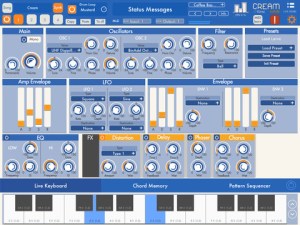
Kirnu Cream Mobile is a very powerful MIDI performer music application for iPad. This version is almost identical to the plugin version except the mobile version includes internal synthesizer and single drum track. The mobile version also has only one arpeggiator track by default. If needed, the other three tracks can be purchased separately via in-app-purchase.

This version can open plugin version presets and vise versa.

Kirnu Cream For iPad

Features
– 4 independent tracks (One track available by default. Other can be added via IAP)
– 12 patterns per track
– Very powerful internal 2 OSC synthesizer FOR EVERY 4 TRACKS
– Two different views: Classic and quick edit view.
– Live Keyboard, Chord Memory and Pattern Sequencer sections.
– Sample accurate MIDI engine.
– Easy to use note hold mode with transpose and bypass functionality.
– Presets are compatible with the plugin version.

– Powerful Pattern Step Data Section:
– Tool section enables easy data editing.
– All data sections are independent from each other.
– Data sections can be looped with several different loop modes.
– Chord memory section enables different chords to be used in every step.
– Sequencer section enables sequencing the notes.
– Accent, order, gate, accent, transposition, note divide, note shift.
– 8 CC controls in each pattern.

– MIDI learn for all knob controls.
– Control Zone for changing most important parameters via external keyboard or MIDI events.
– Audiobus (generator) support
– MIDI sync with host and slave mode

– And lots of more

With Cream Mobile it’s very easy to create catching lead parts, bouncing bass lines, swinging drums and lots of other cool stuff. The only obstacle is your imagination 🙂

Cream Mobile isn’t like any traditional MIDI arpeggiator or sequencer. It’s a lot more. It’s simple and clever design makes it easy to learn and operate. You can easily create cool performances by tweaking only couple of controls. If this is not enough for you there are so many ways you can control Cream that you never feel bored with it.

Cream Mobile

2015
12/21
The Sounds Of A Roli Seaboard For iPhone Roli Noise
Author View comments Tags Tags: , , , , ,

Roli Seaboard Noise

NOISE is a powerful instrument that unlocks the extraordinary expressive potential of your mobile phone. Its unique playing surface takes full advantage of the iPhone 6S’s 3D Touch capability.
Enjoy powerful, multidimensional sounds on-screen or use it as the ultimate portable sound engine for your favorite MIDI controller.

MAKE SOME NOISE
Play a subtle flute melody, a rich textured pad or a killer synth lead. For players of any ability or style, NOISE makes a big impact.

Its unique playing surface is laid out like a piano keyboard from the future. Where you used to have keys, you now have a continuous set of “keywaves.” You can strike, press into, glide left and right, slide up and down, and lift off the keywaves to create unique sonic effects. NOISE is the most expressive mobile sound engine ever created.

Roli Seaboard Noise

FIND YOUR SOUND
NOISE comes with the Fundamentals NOISE Pack bundled, which offers 25 diverse, powerful sounds to get you started.

Breath Flute, for example, allows you to faithfully recreate breath control through pressure, while the sound of Polyrhythmic Loops morphs as you play up and down the keywaves. Try Smoky Rhodes for a cool, modern reinterpretation of the Fender Rhodes.

Expand your collection with unique NOISE Packs – Hybrid Acoustic comes with over 500MB of unique samples, Expressive Electronic includes both vintage synths and contemporary pads, and Synthetic Leads is for when you really just need to shred!

POWER YOUR KIT
NOISE’s deeply expressive Equator sound engine is a great fit for a wide range of MIDI controllers. It has in-built MIDI over Bluetooth, which makes it the perfect choice for wireless music-making on the go.
It is also one of the first apps with built-in, customizable MPE (Multidimensional Polyphonic Expression) Mode, so it also works plug-and-play with any MPE-compatible controller.

To really get the most out of NOISE and to take your musical expression to the next level, try it with our own Seaboard RISE, the award-winning MIDI controller hailed as “the future of the keyboard” (MusicRadar).

THE WORLD OF ROLI
NOISE is the result of years of innovative research and product development that enabled us to create the Seaboard RISE, a uniquely expressive, award-winning MIDI controller that enables 5 dimensions of touch; and Equator, its powerful native sound engine. With NOISE, we have shaped the surface of the Seaboard to maximize playability on an iPhone and remapped the new dimensions of sonic control offered by Equator. NOISE is built with JUCE, the leading cross-platform framework for audio apps.

KEY FEATURES
– Tweak your sounds with onscreen macro controls and XY Touchpad
– Vary the size of the onscreen keywave surface to suit your screen and preferences
– Octave shift buttons and an onscreen sustain pedal add depth to real-time performance
– Control five dimensions of touch – Strike, Press, Glide, Slide and Lift
– Purchase additional NOISE Packs in-app and build your collection of sounds
– Recreate the Seaboard RISE experience on the iPhone 6S and make the most of its new 3D Touch feature
– Audio Units are coming soon. You’ll be able to use NOISE as a synth in your favourite iOS DAW – stay tuned…

MINIMUM REQUIREMENTS
– NOISE for iPhone is designed for iPhone 5C and above.
– Please note that while NOISE works well as a sound engine on all iPhones, you will only be able to take full advantage of its keywave surface with an iPhone 6S or iPhone 6S Plus.

Roli Noise

2015
12/17
LINK to MIDI Ableton Link App For All MIDI Devices
Author View comments Tags Tags: , ,

Link To Midi

LINK to MIDI = Ableton Link to MIDI Clock Sync. This FREE app connects Ableton Link to musical devices that support MIDI Clock Sync. Simply join a Link session, connect your MIDI device, and that’s it. Your MIDI device is now Link-enabled.

WHY USE IT?

In musical setups that include Link, LINK to MIDI makes a connected MIDI device behave like a Link-enabled device.

More specifically, using LINK to MIDI’s Play button, you can start and stop the connected device at any time, and the device will start playing, in phase, at the next quantization tick — set by the Launch Quantization parameter on the main interface.

This is contrast to the typical MIDI Sync implementation, which requires all connected devices to start at the same time and continue playing — otherwise, if you stop, you risk losing beat phase.

Link TO Midi

NOTE: This is essentially LINK to MIDI’s only function!

It may not seem like a big deal, but the freedom to turn your devices ON and OFF at any time can have a huge effect on workflow (at least it does for me).

Also, when the transports of all your devices behave in a consistent way — whether it’s Ableton Live, a Link-enabled iOS app (like Fugue Machine!), or a drum machine built 30 years ago — it’s, well, pretty nice.

Link To Midi

  • iPad Loops is an iOS music production blog dedicated to exposing the best iPad apps musicians, producers, and Djs. This is not a database of every app. It is, however, one of useful recommendations from someone with many years in music production. I try to update it on a daily basis (ok sometimes every two days) and I do my best to post useful apps only. My name is Jason Donnelly (Dj Puzzle). Some of the apps that contain my sounds are Synth One, EG Segments, Hammerhead, Retronyms AudioCopy, Audio Evolution Mobile, and iMPC Pro. My work is published by Roland, Antares, Magix, Soundtrack Loops, Sample Logic, Acoustica, Native Instruments, The Grammt Museum and many more. Subscribe to our RSS feed below to get updated when new apps are posted.
    As an Amazon Associate I earn from qualifying purchases.
  • SUBSCRIBE:

  • FOLLOW ON YouTube

    FOLLOW ON Reddit

    iPadLoops RSS Feed

    Instagram
  • Categories

  • Recent Posts

  • Tags

  • Archives