SoundPrism has to be one of my all time favorite midi controller apps. I am instantly inspired upon touching this app. I first acquired SoundPrism Pro back in 2011 and created a demo video using it to control my Nord Lead 3 (see video below). Now 5 years later we have SoundPrism Link edition. The Link edition allows SoundPrism to sync to other apps and hardware using Live Link by Ableton. Link Edition integrates flawlessly into the new Ableton Link workflow with a totally redesigned sound engine that syncs with other Link enabled apps. This new edition also includes a lot of new sounds and presets. The sound designers behind SoundPrism have always impressed me with their rich beautiful sounds.
Play full arrangements of bass, harmony and melody with just one tap – in sync with all other Link enabled apps.
Features:
* Breathtaking multi-timbral sound engine with massive polyphony and great-sounding effects. SoundPrism Link Edition’s sounds are hand-crafted by Swiss sound designer Oliver Imseng to work beautifully with each other.
* Innovative and improved chord input system: effortlessly play inversions and chord progressions while focusing on your track, not on the music theory behind it.
* A ribbon controller for live manipulation of the built-in effects – all in sync with other Ableton Link enabled apps.
* Interactive tutorial system: SoundPrism walks you through its interface and teaches you how to play.
* Supports Audiobus including state saving.
* Supports Core MIDI. You can even split bass, chords and melody by routing different MIDI channels to different MIDI enabled apps or devices.
I first saw moForte at a NAMM show a couple years ago and was instantly impressed by it’s sound. This new update really put this guitar app over the top. moForte Guitar is a virtual guitar based on modeling the physics and performance techniques of the guitar. Because the moForte Guitar is modeled rather than based on playing back samples, the performance experience is uniquely expressive and interactive.
moForte Guitar App For iOS Winter NAMM 2013
What’s New in Version 1.7
– Inter-app Audio and Audiobus supported instead of a local record button.
– In-app purchases no longer available, previous in-app purchases included free
Features include:
– Modeled feedback and distortion like a real metal guitar.
– Strumming and PowerChord modes.
– A selection of models for popular types of electric guitars.
– Recording and sharing of performances.
– 9,500+ chords.
– Powerful authoring tool for chart creation – supports custom chords and effect presets.
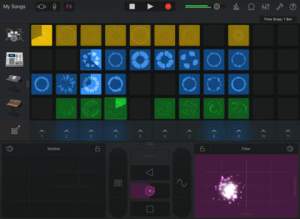
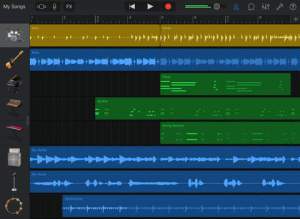
GarageBand turns your iPad, iPhone, and iPod touch into a collection of Touch Instruments and a full-featured recording studio — so you can make music anywhere you go. And now Live Loops makes it easy for anyone to have fun creating music like a DJ, by triggering loops and audio effects in real time. Use Multi-Touch gestures to play a piano, organ, guitar, and drums. They sound and play like their counterparts, but let you do things you could never do on a real instrument. Enjoy Smart Instruments that make you sound like a pro — even if you’ve never played a note before. Plug an electric guitar or bass into your iPad, iPhone, or iPod touch and play through classic amps and stompbox effects. Use a Touch Instrument, a built-in microphone, or a guitar and instantly record a performance with support for up of 32 tracks. Audio Unit Extensions in iOS 9 allow you to play, record and edit third-party instrument Apps right into GarageBand. And share your song using email, Facebook, YouTube, SoundCloud, or AirDrop for iOS.
What’s New in Version 2.1
• Use Live Loops to create music by triggering instrument loops and DJ-style effects in real time using Multi-Touch gestures*
• Add a virtual Drummer to your song who takes direction and performs realistic acoustic & electronic drum grooves
• Record adjustments of any Touch Instrument control knob in real time
• Create and edit automation curves to control the volume of any track
• Shape the sound of a Touch Instrument or audio recording using Simple EQ and Compressor
• Plug in a bass guitar and play through vintage and modern bass amp rigs
• Adds over 1,200 new Apple Loops and sounds
• Record up to 32 tracks simultaneously**
• Use third-party instrument apps in your song with Audio Unit Extensions***
• Directly import or export GarageBand projects using iCloud Drive
• Use 3D Touch to play keyboard sounds with polyphonic aftertouch****
* Live Loops is available on iPhone 5, iPhone 5c, iPad (4th generation), or later devices.
** 32 tracks is available on iPhone 5s, iPad Air, iPad mini 2, or later devices. Multi-track recording requires compatible third party audio interface.
*** Requires compatible third-party Audio Unit Extension instruments apps from the App Store.
**** Polyphonic aftertouch is available on iPhone 6s and iPhone 6s Plus.
Live Loops. Make music like a DJ*
• Use Multi-Touch to tap and trigger any Live Loop cell or group of cells
• Start with a collection of Apple-designed templates like EDM, House and Hip Hop
• Customize a grid or build your own with a library of over 1,200 Apple Loops in a variety of popular genres
• Create your own loop by recording directly into a cell using any Touch Instrument, or live instruments like voice, or guitar
• Use Remix FX and Multi-Touch to perform DJ-style effects like filters, repeaters, and vinyl scratching
• Tap the record button and capture your Live Loop performance
Drummer for iOS
• Add a virtual session Drummer to your song who takes direction and plays realistic grooves
• Choose from 9 acoustic or electronic drummers
• Each Drummer provides their own signature sound and the ability to create a over a million realistic groove and fills
• Fine-tune the drum performance using simple controls that influence the groove and which drums are played
Play your iPad, iPhone, and iPod touch like a musical instrument
• Play musical instruments on the innovative Multi-Touch keyboard
• Record your voice using the built-in microphone and apply fun sound effects
• Recreate legendary guitar or bass rigs using virtual guitar and bass amps & stompboxes
• Use the Sampler to create new instruments from sounds you record
• Use 3D Touch to play keyboard sounds with polyphonic aftertouch****
• Play, record and edit performances from third-party music apps right into GarageBand using Audio Unit Extensions***
Sound like a virtuoso with Smart Instruments
• Play an entire string orchestra with just one finger using Smart Strings
• Tap chords to instantly create keyboard grooves with the Smart Keyboard
• Strum or trigger autoplay patterns on an acoustic and electric Smart Guitar
• Groove with a variety of Smart Basses using upright, electric, and synth sounds
Create a song anywhere you go
• Record, arrange and mix your song with up to 32 tracks** using Touch Instruments, audio recordings, and loops
• Trim and place musical regions exactly where you want them to play
• Automate the volume or fine-tune your mix using the Simple EQ, compressor, echo and reverb
• Record the movement of controls on a Touch Instrument
Share your songs
• Keep your songs up to date across all devices using iCloud Drive
• Create custom ringtones and alerts for your iPad, iPhone, or iPod touch
• Share your songs using email or Facebook, YouTube, and SoundCloud
• Export your song and add it to the iTunes library on your Mac or PC
* Live Loops is available on iPhone 5, iPhone 5c, iPad (4th generation), or later devices.
** 32 tracks is available on iPhone 5s, iPad Air, iPad mini 2, or later devices. Multi-track recording requires compatible third party audio interface.
*** Requires compatible third-party Audio Unit Extension instruments apps from the App Store.
**** Polyphonic aftertouch is available on iPhone 6s and iPhone 6s Plus.
LURSSEN MASTERING CONSOLE — MASTER YOUR AUDIO WITH THE SECRET SAUCE AND KNOW-HOW OF WORLD-RENOWNED MASTERING STUDIO LURSSEN MASTERING
Lurssen Mastering Console puts you at the controls in the studio with all of the secret tools, settings and techniques of world renowned multi-Grammy Award winning mastering engineer Gavin Lurssen and his team. Now you can master your music on the go on your iPad and get the professional, Grammy award-winning sound that the studio is known for. Pop, rock, hip-hop and more, Lurssen Mastering Console can help you achieve amazing mastering results when a trip to Los Angeles just isn’t in the budget.
THE WHOLE IS GREATER THAN THE SUM OF ITS PARTS – THE LURSSEN MASTERING CONSOLE DIFFERENCE
Lurssen Mastering Console is a totally unique and new approach to digital audio mastering. It’s designed to help you capture the magic of the Lurssen Mastering studio’s entire mastering audio processing philosophy. Instead of giving you just a collection of individual processors and presets, Lurssen Mastering Console provides you with models of the complete mastering gear processor chain as a whole. The interactions between the individual processors have been digitally recreated which recreates the synergistic “whole is greater than the sum of its parts” sound that has earned Gavin and Lurssen Mastering multiple Grammys.
With Lurssen Mastering Console, you have automatic access to a lifetime’s worth of professional audio mastering experience. It helps you quickly get great sounding results thanks to its 20 pre-made “Styles” templates, which have been created and optimized by Gavin Lurssen, mastering engineer Reuben Cohen and the rest of the team. These templates reflect decades of combined mastering experience and fit a broad range of musical genres.
Using Lurssen Mastering couldn’t be easier: Just create a project, load a song, then select an appropriate “Style” from the drop-down menu. Take control via an Input Drive knob and a five band EQ as well as a “PUSH” knob, which lets you subtly and uniformly nudge the EQs so you can “ride” the flow of the song and add that special Lurssen “magic” to your music. You can view and automate changes to the two knobs by using the waveform display with three different automation modes. You can make adjustments to EQ settings and save those as presets for easy recall — a preset consists of a style plus your adjustments. You can also view the physical gear chain and make subtle adjustments via the Chain view. When you’ve finished your mastering work, you can export your song to File Sharing, SoundCloud and more in a variety of popular file formats for final distribution and delivery.
With the Lurssen Mastering Console you can easily master audio with your iPad while on the go.
Features:
• Created with Grammy Award winning Mastering Engineer Gavin Lurssen and his team
• Digitally reproduces Lurssen Mastering’s unique studio workflow, techniques and signal chain philosophy
• Synergistic “whole is greater than the sum of its parts” mastering app for iPad
• 20 pre-made “Styles” created by Lursssen Mastering that reproduce the settings and gear used to master different genres
• 3 easy-to-navigate displays: A Studio view with controls, a Wave waveform view and a Chain view for the individual processors
• Controllable Input Drive knob
• Adjustable 5 band EQ with fixed frequency
• “PUSH” Knob to subtly enhance selected song passages via uniform EQ adjustment
• Full automation available to adjust controls to audio content
• Gangable Input Drive control for stereo balance tweaks
• Input/Process assignable VU metering
• Stereo/Mono monitoring capability
• 88.2/96kHz output processing
• Audio import from device library
• FREE app that allows demo of settings and features (limited to first 2 minutes of audio, intermittent silence injected plus no output/export options)
• Single full version in-app purchase “unlock” provides all functions and features of the app
Strum is an intuitive touch-operated MIDI interface for Lemur on iPad. Choose a scale or chord using the selection matrix at the top, and strum your finger across the bars to unleash notes in a rapid array, just like a guitar or harp. Move your finger vertically up and down the bars to manipulate a control value, mappable to pitch bend, filter frequency, or any other instrument parameter. Strum supports a keyboard range of one to five octaves, variable tension, friction, and range settings, three play modes (including the unique auto-sustaining “strum” mode), and a bank of five chords or scales that can be swapped instantly via the left chord selector buttons. Strum is ideal for playing plucked string samples, controlling warbling basses and pitch-bendy leads, improvising melodies across difficult scales, or simply playing chords within a desired key.
Lemur is the world’s best MIDI/OSC controller for iOS. Benefiting from nearly 10 years of development, Lemur is synonymous with multitouch music control. All these major artists can’t be wrong: Daft Punk. Björk, Plastikman, CHVRCHES, Glitch Mob, Sub Focus, Max Cooper, Barker & Baumecker, Orbital and many more.
Version 5.0 introduces the incredible new Canvas object and the Sequencer family of features with rock solid timing.
Canvas — Canvas is a brand new object that lets you script custom widgets with full multitouch support. The object is adapted from the HTML5 Canvas element, which means you can design widgets featuring complex shapes, animation, shadows, and transparency The Canvas object opens the door to a completely new Lemur experience, where the appearance and behaviour of objects can be designed to precisely match the demands of your project. Polygons, waveforms, circular objects and infinitely more are all possible with Canvas.
Sequencer — Lemur 5.0 introduces a family of new features for tight sequencing. This includes three new objects: StepNote, StepSwitch and StepSlider. Each of these provides a different flavour of sequencing and is ready to use right out of the box. The objects do the hard work for you, simply add them to your template and they are ready to control your MIDI instruments.
In App Editor — Design your templates on the fly, without a computer in sight. The In-App Editor, available on iPad only, makes multitouch control truly improvisatory by letting you shape your controller the same way you shape sounds. Virtually every function of the desktop editor application is now available through an intuitive system of iOS menus and widgets. Best of all – it’s easier to use than ever. This means a much smaller learning curve and an immediate initial experience. Any basic configuration, such as a typical bank of faders, can now be created with a few familiar taps and gestures. And any factory template can be adjusted quickly to suit your particular needs.
Skins — Lemur features three new skins, in addition to the classic look. Choose the look that fits your style and get inspired.
LiveControl 2 — Experience the ultimate Ableton Live controller, designed in partnership with master designer ST8. Improvise a riff on the Play page, then switch to the Sequencer page to edit the pattern. Choose a key and scale to guide your melodies and use Quick Chord to instantly create harmonies. Use the Modulate page to flawlessly map any parameter from any plugin to the MultiBall object and take advantage of Physics, LFOs and gesture recording. The Launch page gives you everything you would expect from a clip launcher, and more. We even integrated snapshots and morphing.
REQUIREMENT (for the Lemur Daemon):
– OS X (Intel only) 10.5+
– Windows (XP SP3 or 7 recommended)
The In App Editor feature is accessible only on iPad devices.
CONNECTIVITY
Simply connect your iPad/iPhone to your laptop over Wi-Fi and make the connection! Lemur also supports CoreMIDI allowing you to use hardware interfaces such as Alesis’ iO Dock or the iConnectMIDI or class-compliant USB MIDI interfaces (with a camera connection kit). You can even control up to 8 computers from one iPad with Lemur.
iPad Loops is an iOS music production blog dedicated to exposing the best iPad apps musicians, producers, and Djs. This is not a database of every app. It is, however, one of useful recommendations from someone with many years in music production. I try to update it on a daily basis (ok sometimes every two days) and I do my best to post useful apps only. My name is Jason Donnelly (Dj Puzzle).
Some of the apps that contain my sounds are Synth One, EG Segments, Hammerhead, Retronyms AudioCopy, Audio Evolution Mobile, and iMPC Pro. My work is published by Roland, Antares, Magix, Soundtrack Loops, Sample Logic, Acoustica, Native Instruments, The Grammt Museum and many more. Subscribe to our RSS feed below to get updated when new apps are posted.
As an Amazon Associate I earn from qualifying purchases.