Lofionic Mani is a rich and evocative analogue-modelled chorus effect for iOS, supporting AudioUnit, Inter-App Audio and AudioBus. In addition to the standard mix, rate and depth controls, Mani adds a switchable feedback control, for metallic flanger-like effects, and a pre-delay switch for extra body.
GarageBand turns your iPad, iPhone, and iPod touch into a collection of Touch Instruments and a full-featured recording studio — so you can make music anywhere you go. And with Live Loops, it makes it easy for anyone to have fun creating music like a DJ, by triggering loops and audio effects in real time. Use Multi-Touch gestures to play keyboards, guitars, and drums. Enjoy Smart Instruments that make you sound like a pro — even if you’ve never played a note before. Plug in a guitar or bass and play through classic amps and stompbox effects. Use a Touch Instrument, microphone, or a guitar and instantly record a performance with support for up of 32 tracks. Audio Unit Extensions in iOS 10 allow you to play, record and mix third-party instruments or effects right into GarageBand. And share your song using email, Facebook, YouTube, SoundCloud, or AirDrop for iOS.
What’s New in Version 2.2
• Play and record using the new Alchemy Touch Instrument with over 150 synth patches*
• Quickly find Touch Instruments and patches with a redesigned sound browser
• Capture your voice or instrument and apply studio-class effects like pitch correction, distortion and delay with the new Audio Recorder
• Use new mixing effects, including Visual EQ, Bitcrusher, and Overdrive
• Add third-party effects using Audio Unit Extensions**
• Record multiple times over any song section and choose your favorite using Multi-Take Recording
• Perform with Chord Strips from any keyboard instrument
• Add comments or lyric ideas to your song with an integrated notepad
• Remotely add new tracks to your Logic Pro X project from your iPhone or iPad via iCloud
• Stability improvements and bug fixes
* The Alchemy synth is available on iPhone 6 or later, iPad Pro, iPad Air 2, and iPad mini 4.
** Requires compatible third-party Audio Unit Extension instruments apps from the App Store.
Live Loops. Make music like a DJ
• Use Multi-Touch to tap and trigger a Live Loop cell or group of cells
• Get started with templates like EDM, House and Hip Hop
• Build your own grid using over 1,200 Apple Loops in a variety of popular genres
• Create loops by recording directly into a cell using any Touch Instrument, or live instruments like voice or guitar
• Use Remix FX to perform DJ-style effects like filters, repeaters, and vinyl scratching
• Tap record and capture your Live Loop performance
Drummer for iOS
• Add a virtual session Drummer to your song who takes direction and plays realistic grooves
• Choose from 9 acoustic or electronic drummers
• Each Drummer character provides their own sound and the ability to create over a million realistic grooves and fills
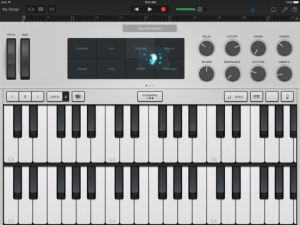
Alchemy Synth
• Play and record using the new Alchemy Touch Instrument with over 150 synth patches*
• Swipe on the Transform Pad to morph and tweak the sound of any patch
Play your iPad, iPhone, and iPod touch like a musical instrument
• Play musical instruments on the innovative Multi-Touch keyboard
• Capture any sound and apply studio-class effects like pitch correction, distortion and delay with the Audio Recorder
• Recreate legendary guitar or bass rigs using virtual amps & stompboxes
• Use the Sampler to create your own custom instrument
• Use 3D Touch to play keyboard sounds with polyphonic aftertouch**
• Record performances from third-party music apps directly into GarageBand using Audio Unit Extensions***
Sound like a virtuoso with Smart Instruments
• Play an entire string orchestra using Smart Strings
• Perform with Chord Strips and autoplay using any keyboard instrument
• Groove with a variety of Smart Basses using upright, electric, and synth sounds
• Strum chords or trigger autoplay patterns on an acoustic and electric Smart Guitar
Create a song anywhere you go
• Record, arrange and mix your song with up to 32 tracks using Touch Instruments, audio recordings, and loops
• Record multiple times over any song section and choose your favorite using Multi-Take Recording
• Use new mixing effects, including Visual EQ, Bitcrusher, and Overdrive
• Trim and place musical regions exactly where you want them to play
• Automate the volume and record the movement of controls on Touch Instruments
• Add comments or lyric ideas to your song with an integrated notepad
Share your songs
• Keep your songs up to date across all devices using iCloud Drive
• Create custom ringtones and alerts for your iPad, iPhone, or iPod touch
• Share your songs using email or Facebook, YouTube, and SoundCloud
• Remotely add new tracks to your Logic Pro X project from your iPhone or iPad via iCloud
* The Alchemy synth is available on iPhone 6 or later, iPad Pro, iPad Air 2, and iPad mini 4
** Requires compatible third-party Audio Unit Extensions apps from the App Store.
*** Polyphonic aftertouch is available on iPhone 6s or later.
**** 32 tracks is available on iPhone 5s or later, iPad Pro, iPad Air or later, and iPad mini 2 or later. Multitrack recording requires a compatible third-party audio interface.
Slice your audio samples with ReSlice and create flexible musical atoms which can be triggered by MIDI notes or the touch of your fingers. The polyrhythm Arpeggiator redefines the art of creating new loops from the extracted slices. Record live or import audio from clipboard or AudioShare to break it up into its rhythmic components. Apply the intelligent slice parameter and Arpeggio randomizer for instant creation of the unheard.
### introductory offer for a limited time ###
Features:
Audio Slicer
• Automatic break up of sample/drum loop into up to 32 slices
• Edit slice positions.
• Edit level, pan, pitch and envelope for each slice
• Import audio from clipboard or AudioShare
• Record audio for instant slicing and reusing in realtime
Effect section
• Seven studio standard effects concurrently usable:
• Oversampled distortion with four different algorithms for antialiased sound.
• Lowpass / Highpass / Bandpass parametric equalizer
• 8 pole analog Phaser
• Flanger
• Four line chorus
• Stereo/Ping-Pong delay with glitch free delay time change.
• Hi end reverberation unit.
Four part Polyrhythm Arpeggiator
• Uses programmable sequences with up to 32 steps.
• Trigger slices using 4 arpeggio parts with different settings
• Unique randomizer generates Arpeggios with 100% usability.
• Factory arpeggios included, unlimited user arpeggios possible.
Global
• AUv3 AudioUnit
• Inter App Audio
• Audiobus 2 support with state saving.
• Play slices live with the onscreen keyboard.
• Can use CoreMIDI compatible MIDI Keyboard.
• Audio recorder with share function.
• Share user presets.
• Support for virtual MIDI input connections.
• Multichannel MIDI Learn for external MIDI controllers.
• MIDI Tempo sync. Start/Stop Arpeggio.
• Ableton Link compatible.
MDP2 (MIDI Designer Pro 2) is an app for building your own customized MIDI controllers for iOS devices such as iPad and iPhone. You can choose from tons of preset templates for popular hardware devices and software DAWs OR create your own.
2016-12-20: 50% Off (for now)!
Dream, create and play your perfect MIDI controller with MIDI Designer Pro 2:
○ Reviewed and loved by DJ Tech Tools, Recording Magazine, Sound on Sound and Keyboard Magazine
○ Winner of Sonic Touch Gold Award for Best App
○ Trusted on stage by veteran touring acts like Todd Rundgren and newer projects like POSTYR and Groove Boston
○ A studio cornerstone for music producers like Shadow Child and Oliver for tweaking tons of vintage gear
○ Used by musicians, VJs and DJs all around the world
○ The platform of choice for community- and professionally-sourced layouts for top-flight gear (e.g., Korg, Roland, Moog, Eventide, Yamaha)
If you can dream it, you can create it in MIDI Designer.
○ Control all MIDI-enabled hardware and software: synths, effects, DAWs, plug-ins, DJ, VJ & lighting rigs, other iOS apps, robots, cruise ships, rail guns, particle accelerators
○ Near-zero latency connections via Wi-Fi, Bluetooth, Lightning Cable (with musicIO) or any class-compliant MIDI hardware
○ Design your perfect controller using customizable knobs, sliders, XY pads, labels, panels and more
○ Use supercontrols and subcontrols for advanced functionality with no scripting, ever
○ Choose background color, texture and LED color for up to 8 banks of 6 pages each
○ Save, load and share your layouts and pages
○ Send/receive all MIDI message types (e.g., sysex, NRPN and 14-bit CC)
○ Use MDP2 as a heads-up display for external hardware via the “Pedalboards Feature”
○ Explore presets and other features at mididesigner.com/manual: discover a mature, reliable platform for your controller design and performance
MDP2 is easy to use, infinitely flexible and customizable, and battle-tested in performance. It’s the most-respected MIDI controller for iOS
* * * * * dream | create | play * * * * *
WHAT’S NEW IN MDP2?
○ Completely-redesigned look: Glow. More beautiful, practical and functional with a new Home screen
○ IAP with new control types: Image Panels, Pickers and Meters (free DAW plugin from musicIO)
○ Preset Packs: share global presets with users of the same layout
○ Browse and upload within MDP2 to interact seamlessly with the Community
○ Hundreds of smaller new features, bug fixes and under-the-hood improvements for greater flexibility, stability and speed
The MIDI Designer Community has built layouts for popular MIDI targets, including:
○ Akai: Miniak (= Alesis Micron)
○ Cakewalk: Sonar
○ CamelAudio: Camelspace, CamelPhat
○ Casio: XW Solo Synth (XW-P1, XW-G1), Privia PX-5S
○ Clavia: Nord Lead 4
○ Dave Smith Instruments (DSI): DSI MoPho, DSI Desktop Evolver
○ Eventide: Pitchfactor, Timefactor
○ Fractal Audio: Axe FX II
○ IK Multimedia: Amplitube
○ Jomox: MBase 11
○ Kawai: K3m, K1r Vector Control
○ Korg: 707, DSS-1, EX-8000, ElecTribe R (ER-1), Monotribe, Volca Series
○ Line6: Pod v2.0, Pod HD-500, DT-50 Series, POD X3 Live
○ Moog: Animoog, Little Phatty, Slim Phatty, MF-104m Analog Delay
○ Mutable Instruments: Shruthi, Anushri
○ Novation: Bass Station
○ Peavey: AT-200 Auto-Tune Guitar
○ Pioneer: RMX-500 (VST/AU)
○ Roland: JX-3P (PG-200), JX-8P (PG-800), MKS-30, MKS-50 (PG-300), JD-990, VG-99, Alpha Juno, Fantom X
○ Sequential Circuits: Prophet 600, Six-Trak
○ Sonic Charge: MicroTonic VST (μTonic)
○ Sonic Potions: LXR Digital Drum Synth
○ Strymon: “Trio” (BigSky, TimeLine, Mobius)
○ A Tasty Pixel: Loopy HD
○ TC Electronic: Nova Drive NDR-1
○ ValhallaDSP: ÜberMod, VintageVerb, FreqEcho, Shimmer, Room
○ Waldorf: Blofeld, Pulse, 4-Pole
○ Yamaha: S90, DX7 Reface, CS6X/R
iPad Loops is an iOS music production blog dedicated to exposing the best iPad apps musicians, producers, and Djs. This is not a database of every app. It is, however, one of useful recommendations from someone with many years in music production. I try to update it on a daily basis (ok sometimes every two days) and I do my best to post useful apps only. My name is Jason Donnelly (Dj Puzzle).
Some of the apps that contain my sounds are Synth One, EG Segments, Hammerhead, Retronyms AudioCopy, Audio Evolution Mobile, and iMPC Pro. My work is published by Roland, Antares, Magix, Soundtrack Loops, Sample Logic, Acoustica, Native Instruments, The Grammt Museum and many more. Subscribe to our RSS feed below to get updated when new apps are posted.
As an Amazon Associate I earn from qualifying purchases.