2017
08/20
Roli Noise Hip Hop Jam
Author View comments Tags Tags: , , , , , ,

NOISE is a free app that makes music mobile, so you can play and learn music anywhere you take your connected device. Using simple, easy-to-learn gestures, you can create beats, melodies, and songs with a huge library of sounds. Play NOISE on your phone or tablet, and extend its musical powers by pairing NOISE with ROLI BLOCKS, the modular music studio. NOISE was developed by music technology pioneer ROLI.

What’s New in Version 2.5.1
Introducing Mixing!
– Control the level of your tracks on screen or turn your Lightpad into a bank of faders
– Access the mixer by tapping on the Volume icon whilst in the song view or configure your Lightpad in My Studio

Bug Fixes:
– Synth presets could be pitched up if iDevice changes sample rate
– Occasionally synth presets would be silent when running other apps in the background
– Clips could get deleted when using the undo button

A NEW APPROACH TO MAKING MUSIC
Your touch screen becomes a real musical instrument with NOISE, which lets you shape sounds by drumming the screen, gliding your fingers along it, pressing into it, and lifting off. You make music through intuitive gestures on a grid of colorful pads. Each pad is a particular instrument or a note in a scale.

AN INSTRUMENT AND A STUDIO IN ONE
NOISE makes you both a performer and a producer. Start by choosing from custom-made sounds that range from bongo drums to string sections to zithers. Shape those sounds into beats and melodies, and record them as loops. Then mix and match these loops and build amazingly multi-layered songs.

DESIGNED FOR LEARNERS
If you love listening to music but don’t think you can play an instrument, NOISE may change your mind. It’s a fun, interactive learning tool. In Learn Mode, just trace illuminated Light Trails to learn how to shape beats and melodies. Choose from one of 15 scales, and the notes of that scale light up on the grid. Turn on Hide Mode to always stay in tune — it hides notes that not in the key. Use Snap Mode to stay in time — it snaps your performance to the tempo.

Get Roli Noise (free)

ROLI BLOCKS TAKES YOUR MUSIC TO THE NEXT LEVEL

BUY ROLI Lightpad Block

The power of NOISE expands when you connect to ROLI BLOCKS, the modular music studio. Pairing wirelessly, NOISE becomes the sound engine for Lightpad Block and Seaboard Block. Learn more about BLOCKS on ROLI.com. On the pressure-sensitive surfaces of these Blocks, you can shape sounds and play songs in a way that is similar to the experience of playing NOISE on an iPhone or an iPad. But you can be even more expressive.

2017
08/18
Beatmaker 3 Update Includes New Sounds
Author View comments Tags Tags: ,

BeatMaker brings unmatched efficiency and depth in an intuitive audio and MIDI workstation. Look no further, the power of traditional desktop software and real hardware is now united into one single production studio.

What’s New in Version 3.0.2
• New free sound pack
• Added 16 bank groups, each bank group has 8 banks, giving a total of 128 banks.
• Added focus actions to jump to a specific bank group, and iterate to the previous or next bank group.
• Added a MIDI Panic! button in the MIDI tab in the Settings screen.
• Added the saturator effect to the main FX list.
• Added an option to save a bank preset either in the current directory or in the main/general ‘Bank Presets’ directory.
• Added a ‘Set value on all layers’ options in the parameter panel. This will set the current value on all layers, and also works for layer FX and modulators ‘siblings’.
• Added the ‘auto-scale’ feature back from BM2 in the sample duration panel. This lets you pitch a sample on a specific bar length.
• Added default layer gain in settings/general.
• Added browser preview volume in settings/general.
• Can now reset step modulator steps by double-tapping them.
• Added full-screen option for step-modulator.
• When double-tapping an hardware output track in the mixer, it will open the FX panel, like for AUX tracks.
• Added current status text when scanning files (database update or reset).
• Added error messages for network connection issues in the sound store.
• New hard-reset option for database in settings/general. Use with care.
• Fixed sample saving from audio tracks/clips.
• Properly update steps after loading a step modulator preset.
• Improved AUv3 instantiation and clearing.

Get Beatmaker

2017
08/18
Inexpensive Real Time Harmonizer App
Author View comments Tags Tags: , , , , ,

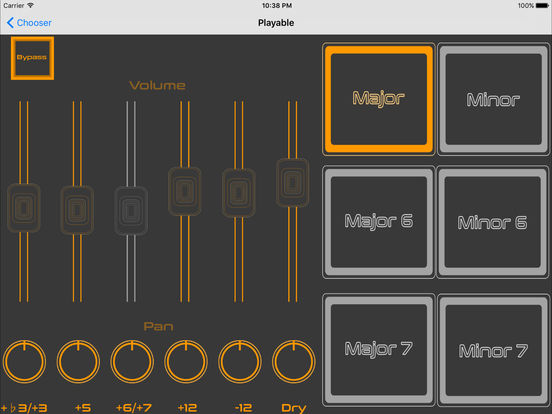
Zen Musical Harmonizer ZMH-1 is a vocal/instrument harmonizer app. ZMH-1 has four different ways to interact with harmony (one at a time).

**Playable Harmonizer–Play different chord buttons (Major, Major 6, Major 7, minor, minor 6, minor 7) to transform your one note into harmony in real time.

**Pseudo-Smart Harmonizer–Reads your monophonic input signal (guitar, voice, etc.) and generates the correct harmony notes based on the chosen key.

**Shifter–Shift your signal with a choice of intervals.

**Octave–Makes your signal sound huge with up-to-five octaves per single note played or sung.

ZMH-1 is ready to be used in the studio and on stage. Use it with “real” music gear or alongside your other iOS music creation apps.

What’s New in Version 1.0.3
**Now in Stereo
**New Graphics
**Support For Landscape Orientation (Portrait Orientation No Longer Available)
**Each Channel Now Gets A Respective Pan Knob
**New Icon
**New Help Manual
**Supports iOS 10

It supports:

**Audiobus (Third-Party App)
**Inter-App Audio
**Landscape Orientation
**Stereo
**Pan Knob For Each Channel
**Volume For Each Channel

Get Zen Harmonizer

2017
08/18
Free Vinyl Drum Kit For Patterning!
Author View comments Tags Tags: , , , , ,

Want a free Vinyl drum kit for Patterning? Well you’re in luck! I took my Vinyl Grooves sample pack from Soundtrack Loops and formatted it for Patterning. I’m giving you this awesome sample pack to celebrate my 7.5 year anniversary!


(click image above to get the kit. Requires Patterning!)

You’ll get authentic crackly vinyl noise straight from real records and drum hits processed to sound like a crusty old 45.

Get Patterning

Get the full Vinyl Grooves sample pack from Soundtrack Loops here https://soundtrackloops.com/shop/genre/vinyl-grooves-ni-battery-one-shots-ni-kontakt/

2017
08/17
DM2 Update Adds Drone Machine
Author View comments Tags Tags: , , , , ,

DM2 is a synthesis-based drum machine with a dedicated graphic editor, for the creation and manipulation of sound. DM2 is fully MIDI-mappable with more than 130 assignable parameters that can be controlled by an external MIDI controller.

What’s New in Version 1.6
Introducing the “DRONE MACHINE”. With the brand new “Drone Machine” mode DM2 turns into an instant Ambient machine. All 9 tracks play continuously regardless of what the sequencer plays. Switch it on and drive a powerful Dream Machine at the tips of your fingers. Extremely versatile when used with a MIDI controller and MIDI Learn mode. Dark Ambient admirers, Space Rock lovers, Dream Music adorers, Minimal fetishist are welcome.

** AMENDED**
+ AUDIO ENGINE : Improved CPU management when idle in the background
+ Faster loading time

A BIG, BIG STEP SEQUENCER. 16 or 32 step patterns. Or why not 7 or 25 steps? Or even polymetric tracks (poly what? no worries, just a fancy word for complex rhythms, yet super easy to make). And while we are at it, steps can also be singles, duplets, triplets or quadruplets for even sophisticated rhythms. Again it is all about drawing funny objects to make funky beats.

THE DRUMS PAGE. Where the sonic magic happens. Six touchable graphs to create sounds. Oscillators, LFOs, filters, noise generators, all the usual suspects in a drawable interface. This may look a tiny bit daunting at first, but the beauty is that whatever you touch, you’re not going to break anything. So give everything a whirl, and get experimental. And if you need some inspiration, DM2 contains plenty of ready-made sounds too.

THE PADS PAGE. Maybe you prefer finger-drumming? Sure, go ahead. Press REC and record your rhythms. Of course, there is an automatic quantize function, so that you’ll never miss a beat again.

THE MIXER PAGE. Big and beautiful, it will transform your iPad into a professional mixing desk for the price of a magazine.

THE FX SECTION. A powerful Effect processor. Just switch everything on and see where it takes you.

THE SONG PAGE. Last but not least, put all your hard work in the previous pages together in a shiny song.

Get DM2

  • iPad Loops is an iOS music production blog dedicated to exposing the best iPad apps musicians, producers, and Djs. This is not a database of every app. It is, however, one of useful recommendations from someone with many years in music production. I try to update it on a daily basis (ok sometimes every two days) and I do my best to post useful apps only. My name is Jason Donnelly (Dj Puzzle). Some of the apps that contain my sounds are Synth One, EG Segments, Hammerhead, Retronyms AudioCopy, Audio Evolution Mobile, and iMPC Pro. My work is published by Roland, Antares, Magix, Soundtrack Loops, Sample Logic, Acoustica, Native Instruments, The Grammt Museum and many more. Subscribe to our RSS feed below to get updated when new apps are posted.
    As an Amazon Associate I earn from qualifying purchases.
  • SUBSCRIBE:

  • FOLLOW ON YouTube

    FOLLOW ON Reddit

    iPadLoops RSS Feed

    Instagram
  • Categories

  • Recent Posts

  • Tags

  • Archives