2011
08/30
Learn To Play Guitar With iPad
Author View comments Tags Tags: , , , , , ,

Guitar Jam Tracks iPad App

Guitar Jam Tracks by Ninebuzz Software

MAKES LEARNING GUITAR FUN
Practice jamming, learning the Pentatonic scale and soloing to 5 great sounding jam tracks right from your iPhone/iPad! Our easy-to-read scale charts show you exactly where to put your fingers to start sounding like a pro. See for yourself why thousands of guitarists love our jam track apps!

  • Take a listen 
  • NINEBUZZ AWARDS AND HIGHLIGHTS
    ★ Guitar World – Top 15 Guitar Apps
    ★ Premier Guitar – Pocket Power Tools
    ★ Gizmodo – Best Apps of the Week
    ★ Apple – Featured – What’s Hot
    ★ Apple – Featured – Band in your Hand
    ★ AppAdvice – “You’ll be anxious to practice your chords and scales”
    ★ iPhoneAppCafe – Top 5 Apps for Guitarists

    Jam along with your guitar and an iPhone or iPad

    KEYS INCLUDED:
    ✔ A Major / A Minor
    ✔ B Major / B Minor
    ✔ C Major / C Minor
    ✔ D Major / D Minor
    ✔ E Major / E Minor
    ✔ F Major / F Minor
    ✔ G Major / G Minor

    STYLES INCLUDED:
    ✔ Acoustic Blues
    ✔ Humbucker Blues
    ✔ Jazz
    ✔ Reggae
    ✔ Rock

    SCALES INCLUDED:
    ✔ Major Pentatonic
    ✔ Minor Pentatonic

    ————————————————-

    HOW IT WORKS:
    1. Pick a key to start playing the track.
    2. Tap ‘Chords’ to see what chords are being played (rhythm)
    3. Tap ‘Scales’ to see the scale charts for that key (lead)

    ★CHANGE THE STYLE AT ANY TIME!★

    PRACTICE TIPS:
    Learn the chord progression for each track, and then jump over to practicing scales. Guess what? There are only 5 ‘shapes’ of the pentatonic scale to memorize! Once you know them up and down, learn where they start for each key. Soon, you’ll be able to solo over 99% of the music out there! Gain more versatility by playing in different modes (major/minor/blues major/blues minor) too.

    WHAT IS THE PENTATONIC SCALE?
    It simply means 5-note scale. It is widely used in virtually every style of music, and is one of the most important scales a guitarist can learn. There are 5 shapes, or finger patterns, to memorize. These never change; only the starting position changes for each key. Once you learn one key, the rest will come easy!

    TIPS FOR THE SCALE CHARTS:
    – Black dots are regular notes.
    – Red dots are ‘root notes’. These are notes of the key you are in.
    – Blue dots are ‘passing notes’. Including these notes puts you in a Blues mode.

    PRACTICE SCALES WITH EASE
    Major and Minor Pentatonic scale charts are included for every key. We show you where to put your fingers – just start playing a track, load up the scales and go! You’re instantly jamming with the band.

    FOR RHYTHM AND LEAD PLAYERS
    Every track has a listing of chords that are used in the track, along with scale charts – practice rhythm or lead with ease!

    A GREAT INVESTMENT
    You will get hours and hours of use out of this little app. Practicing guitar shouldn’t be boring – download this app today and make practice fun!

    IT’S SO EASY TO USE
    We created the simplest, fastest and most enjoyable way to practice guitar on a mobile device. Just tap a key and hit play!

    BUILD CONFIDENCE
    Practicing your scales is the best way to get comfortable with the fretboard. Once your learn the 5 different shapes of the pentatonic scale in every key, you’ll be able to play along and solo to nearly any song!

    ————————————————-
    CREATED BY GUITARISTS, FOR GUITARISTS
    ————————————————-

    Don’t fear the fretboard — conquer it one scale at a time with Guitar Jam Tracks!

    2011
    08/30
    Make Beats From Found Sound Instantly
    Author View comments Tags Tags: , , , , , , ,

    RealBeat iPhone and iPod Touch App

    RealBeat by Joerg Piringer app for Mac is now available for your iPhone and iPod Touch.

    You can beat reality!

    Record your voice, your fridge, your neighbour’s dog or let your iPhone or iPad speak and make rhythms out of the sounds immediately.

    RealBeat concentrates on simplicity and fast results. No steep learning curve or cluttered screens! Get creative in an instant!

    RealBeat is a sampler that enables you to record sounds and create rhythms out of them. It also features an easy way to let your device speak and use the sound as a source material for rhythms and loops.

    * Sampler (record sounds easily)
    * Text to Speech (let your device speak for you)
    * Modify the sound (pitch, reverse, distortion, reverb, …)
    * Sequencer (make rhythms)
    * Patterns (modify the rhythm easily)
    * Live effects (manipulate in realtime)
    * Mixer
    * Export sounds to other apps via Audio Copy
    * Export sounds to your computer via iTunes
    * Works with internal microphone

    RealBeat offers simple and fast access to sampling and manipulating recorded sounds live or at home. Expect lots of fun with your own samples & sounds.

    IMPORTANT: to sample sounds on an older iPod touch you need a microphone like a headset with a microphone.

    RealBeat here:

    2011
    08/29
    Fostex Headphone Amp For iPod and iPhone
    Author View comments Tags Tags: , , , ,

    Fostex Headphone Amp For iPod and iPhone

    The new Fostex HP-P1 is the World’s first portable headphone amplifier with D/A converter which receives it’s audio signal digitally from iPod/iPhone 30-pin dock connector. Featuring an ultra-high quality 32bit DAC and exclusively designed audiophile analogue circuitry, the sonic performance and fidelity of the headphone signal simply has to be experienced to be believed. The tone, the depth and the effective headroom is nothing short of stunning, giving the impression of almost limitless audio power reserves on tap at all times.

    Add to this a 3-step gain control to accommodate all types of headphones, an in-built /PDIF Digital Out, twin digital filters and a rugged, yet cool, aluminum alloy chassis and you simply have the best portable headphone amp for your iPod / iPhone available.

    Everything about the Fostex HP-P1 screams quality. – First up is the audio processing. Utilising 32bit AKM’s AK4480 which features innovative on-chip symmetrical circuitry to avoid noise coupling, thus improving sound quality, coupled with 2 filters including a 32-bit minimum delay filter designed specifically for acoustic sounds the HP-P1 delivers exceptional sonic performance, allowing music to ‘flow through’ to your ears in an supremely natural way.
    Then there’s the build quality and the sheer beauty of the thing. Engineered from aircraft grade aluminium and built to exacting standards, the HP-P1 is a tactile delight to handle and operate.

    Exclusive Carry Case Included
    The HP-P1 comes complete with an exclusively designed carry case which can be clipped to a belt if desired. In addition, a 50mm Dock connector USB cable and a USB power cable (Type A to mini B) are also included.

    In Detail

    Digital connection from iPod/iPhone to HP-P1 via 30-pin dock connector
    High quality 32-bit DAC (AKM4480) and headphone amp for maximum sound quality
    Lithium-Ion rechargeable battery (approx 7 hours)
    USB powered operation also available
    Hi/Mid/Low 3-step gain control on the headphone out drives all headphone types
    Auxiliary analog Line Input for other MP3 players
    S/PDIF Digital Out for professional recording
    Analog Line Out for connection to an analog amplifier or a recorder
    Unique Digital Filter – use regular filter or unique “minimum delay filter” without pre-echo
    Housed in a rigid aluminum alloy chassis

    BUY Fostex HP-P1 Headphone Amplifier

    2011
    08/29
    FourTrack Recorder For iPhone and iPod Touch
    Author View comments Tags Tags: , , , , ,

    FourTrack iPhone and iPod Touch App

    FourTrack 2.0 by Sonoma Wireworks and Retronymns recorder for iPhone. Want to keep it simple? Try this app!

    FourTrack 2.0 from Retronyms on Vimeo.

    Features:

    • Multitrack recording: use bounce for more than 4 tracks
    • 16 bit, 44.1 kHz recording quality
    • Pan Control: move tracks from left to right
    • Timeline: seek to anywhere in a song instantly
    • Latency Compensation: accurate to within 1ms
    • Compressor-Limiter: fattens sound of output mix
    • Bounce: mix song to track 1 and 2 of a new song to record as many tracks as you want
    • Metronome: select tempo by number or tapping. Record along with real drums, including beats by celebrity drummer Jason McGerr (Death Cab for Cutie)
    • Wi-Fi sync to a computer & import into any recording software
    • Wi-Fi sync to RiffWorks T4 free to add effects, mix to WAV or OGG, post to RiffWorld.com for an MP3, capture pain and gain settings and more
    • MasterFX: sweeten the sound of your recordings with a compressor-limiter and a 4-band parametric EQ
    • AudioPaste from compatible AudioCopy apps including InstantDrummer, DopplerPad, Morphwiz, iShred, VoiceJam, and dozens more
    • PromoTracks: download individual PromoTracks from a variety of artists directly into a FourTrack song to add more tracks, mixdown with effects, export and more.
    • File Import – Import audio into FourTrack by opening an audio email attachment or by dragging audio files into FourTrack’s FileImport area in iTunes. Supports .wav, .mp3 and .aiff formats. This feature requires iOS 4.0 and iTunes 9.2 or above.
    • AudioCopy – Copy a track or a mix in FourTrack. Name a copy to easily identify it in the AudioCopy history list of up to 12 items which includes audio previews. Paste to another track in FourTrack, to another song in FourTrack, to any AudioPaste enabled app, and to apps that support Apple’s general pasteboard: http://www.sonomawireworks.com/iphone/audiocopy/#apps
    • Input Monitoring – Use FourTrack’s settings tool to enable/disable input monitoring. Input monitoring is enabled when a track is armed and in either Pause or Record mode. Playback of existing tracks overrides input monitoring. When input monitoring is on, sliders on armed tracks are enabled and control the monitor mix.
    • GuitarJack Control Panel – Adjust the input settings of the new GuitarJack audio accessory for compatible iOS devices (not iPhone 4, iPod touch (4th generation or iPad). Select from 1/4″, stereo 1/8″ or both inputs simultaneously, and adjust input levels with 60dB of analog gain control. FourTrack remembers GuitarJack settings. Settings are maintained by the GuitarJack while powered, and it can be used by most apps that do recording or playback such as tuners, amp models, and more. When a stereo mode is selected, tracks will arm in pairs (1&2 or 3&4). GuitarJack features, guide, images, compatibility, and video: http://www.sonomawireworks.com/guitarjack
    • TaylorEQ – Sonoma Wire Works teamed with Taylor Guitars to create an input EQ for enhancing the FourTrack recordings of Taylor Guitars or any acoustic instrument. Select from a range of Taylor body styles in basic mode, or select the Advanced tab to adjust the 6 band parametric equalizer manually.
    • ARM Optimized Audio Engine – Hand optimized assembly code makes this the fastest running FourTrack release ever.
    • Higher Resolution Graphics: Optimized for the iPhone 4 Retina Display.

    2011
    08/29
    Play Sound Fonts On iPad And iPhone
    Author View comments Tags Tags: , , , , , , , ,

    Bismark BS-16i App

    bs-16i is a 16 multi-timbral playback sampler. It supports SoundFont, and can be used for keyboard instrument, MIDI sound module, and MIDI player.

    The sampler engine is ported from bs-1 / bs-16, which is developed as professional plug-in for Logic (Audio Units) and Cubase (VST instrument).

    What’s New in Version 1.4

    – Allowed loading 4 SoundFont files
    – Added Virtual MIDI Port / Background support
    – Integrated CoreMIDI implementation
    – Added pre-install SoundFont by S. Christian Collins

    Using SoundFont libraries, you can play with your great number of Instruments.
    It supports all standard MIDI messages, using pre-installed GeneralUser GS SoftSynth v1.43.sf2 (S. Christian Collins), your iPhone and iPad can be used as a GM (General MIDI) sound module.

    As a keyboard instrument, you can play with scalable keyboard, pitch bend wheel, and many control change controllers.

    Internal MIDI player supports SMF (Standard MIDI File) format.

    SoundFont and SMF files can be sent using internal Wi-Fi server. Also you can use file sharing functions of iTunes.

    Moreover, this application supports Core MIDI Interface like as IK Multimedia iRig MIDI, YAMAHA iMX-1, LINE6 MIDI Mobilizer 2, Apple Camera Connection Kit with USB MIDI Interface, and LINE6 MIDI Mobilizer 1. With them you can communicate with other external MIDI hardware like as synthesizer, sequencer.

    – internal WiFi server may be unstable for a part of environments. iTunes file sharing will be recommended.
    – To load the specified soundfont file, the device have to ready free memory larger that file size of it.
    – Internal player is not connected to MIDI Mobilizer’s MIDI output.
    – According to the specification of MIDI Mobilizer, timing error may occur when a lot of messages are sent to the application. It can be fixed by using “Buffering” option in application’s setting menu.
    – This application collects following information: Device name, OS version, User Location, SoundFont file name.

    BS-16i is available for $8.99

    • iPad Loops is an iOS music-production blog dedicated to highlighting outstanding iPad apps for musicians, producers, and DJs. Rather than cataloging every available app, the site offers carefully selected recommendations based on years of experience in music production. To make the text appear white, select the block in the WordPress editor, open the block settings, choose Text color, and select white. If it still doesn’t appear white, check whether your theme or custom CSS is overriding the block’s color setting.

    • I aim to update the blog daily—though sometimes updates may take a couple of days—and focus on sharing useful, high-quality apps. My name is Jason Donnelly, also known as DJ Puzzle.

    • My sounds have been featured in apps including Synth One, EG Segments, Hammerhead, Retronyms AudioCopy, Audio Evolution Mobile, and iMPC Pro. My work has also been published by Roland, Antares, Magix, Soundtrack Loops, Sample Logic, Acoustica, Native Instruments, The GRAMMY Museum, and many others.

    • Subscribe to the RSS feed below to receive updates whenever new apps are featured.

    • As an Amazon Associate, I earn from qualifying purchases.

    • Archives

    • Categories

    • FOLLOW ON YouTube

      FOLLOW ON Reddit

      iPadLoops RSS Feed

      Instagram
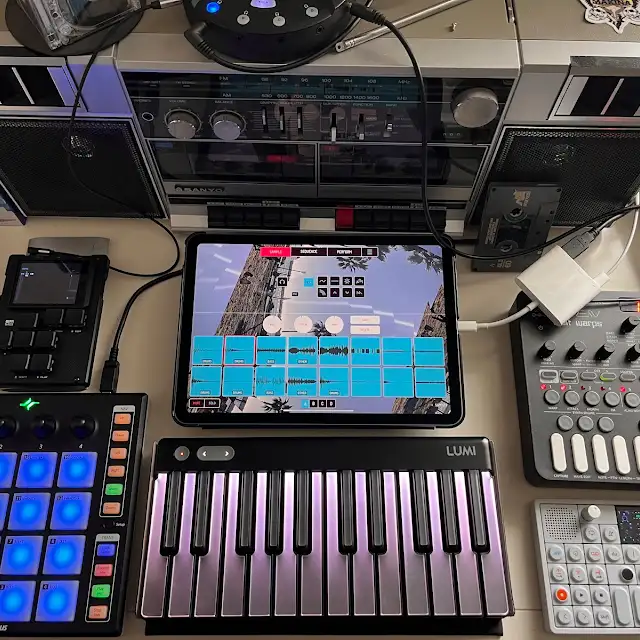
    • My iPad music production studio setup

      IPADLOOPS GEAR PICKS

      Make Music. Make More.

      Discover the gear I recommend for making music with iPad. Controllers, interfaces, headphones and more.

      SHOP MY AMAZON PICKS →

      As an Amazon Associate I earn from qualifying purchases.