2011
07/27
iRig Midi Interface For iOS Devices
Author View comments Tags Tags: , , , , , , ,

iRig Midi Interface For iOS Devices

IK Multimedia tell us that iRig MIDI is an ultra-compact standard Core MIDI interface for iOS that connects any MIDI compatible device to the iPhone, iPod touch and iPad. Here’s the rest of the details from IK:

iRig MIDI connects MIDI keyboards, drum machines, drum pads, pedal boards and more to an iOS device to control not only the included SampleTank FREE* but also a world of MIDI-compatible apps such as GarageBand®. You can also use iOS apps to control external MIDI equipment such as sound modules, DAWs or lighting systems right from the mobile device.

iRig MIDI is the only compact iOS MIDI interface sporting 3 MIDI ports: IN/OUT/THRU. These connect to any standard MIDI jacks using the included 2 x 1.6m/5.2′ cables. iRig MIDI also has 2 LEDs for displaying the MIDI activity on the IN and OUT ports.

iRig MIDI also exclusively provides a micro USB port – with included cable – that connects to any standard USB power supply source so that the iOS device can stay fully powered during long sessions.

Features:

Standard Core MIDI interface connects any MIDI hardware device to Core MIDI-compatible apps like SampleTank FREE and GarageBand®
Directly connect MIDI keyboards, synthesizers, drum machines, drum pads, pedal boards and more using the included 2 x 5.2′ (1.6 m) MIDI 5-pin DIN cables
3 MIDI ports: IN/OUT/THRU
2 LEDs for MIDI IN/OUT activity display
Micro USB port can charge the iOS device while in use
Free apps included: SampleTank FREE the powerful sample-based sound module app and iRig MIDI Recorder FREE

BUY IK Multimedia iRig Midi for iPhone/iPod touch/iPad

BUY IK Multimedia iRig MIDI 2

2011
07/27
iRig Guitar Interface For iPhone
Author View comments Tags Tags: , , , , , , , , ,

iRig Guitar Interface For iPhone

iRig Guitar interface adapter is the easiest way to get your instrument’s signal into iPhone/iPod touch/iPad. Simply plug iRig into your mobile device, plug your instrument into the iRig, plug headphones or amplifier to the output and you are ready to rock!

The iRig is the ideal companion not only to the mobile AmpliTube app, but also works with any other recording, processing or tuning app. Plus, you can also use the iRig with line level signal sources such as synthesizers, keyboards or mixers.

AmpliTube App

iRig Features
– Works on iPhone/iPod touch/iPad
– 1/4-inch female mono input jack connector
– 1/8-inch female stereo output mini-jack connector
– Connect electric guitar and bass
– Also works with line level signals from synthesizers, keyboards, mixers
– Output can be connected to headphones, amplifiers, powered speakers, mixers

Complete Interface and Software Solution
AmpliTube iRig is a combination of an easy-to-use instrument interface adapter and guitar and bass tone mobile software.

With AmpliTube iRig, you can plug your guitar into your iPhone/iPod touch/iPad and jam anywhere with world class guitar and bass tone right in the palm of your hand – from the leader in studio-class guitar and bass software.

Simply plug the iRig interface into your mobile device, plug your instrument into the appropriate input jack, plug in your headphones, amp or powered speakers, download AmpliTube for iPhone Free and start rocking!

You’ll have at your fingertips the sound and control of 3 recombinable simultaneous stompbox effects + amplifier + cabinet + microphone just like a traditional guitar or bass stage rig!

Add amps and effects as you need them — you can expand your rig with up to 11 stomps, 5 amps, 5 cabinets and 2 microphones in the AmpliTube iRig app custom shop.

BUY IK Multimedia iRig 2 guitar interface adaptor for iPhone, iPod touch, iPad, Mac and Android

2011
07/27
SampleTank For iPhone
Author View comments Tags Tags: , , , , , , ,

SampleTank iPhone App

NOW, MAKE RECORD-READY MUSIC EVERYWHERE WITH HUNDREDS OF PRO-QUALITY SOUNDS AND PATTERNS.

SampleTank is the first professional quality sound and groove module that puts hundreds of world-class instruments and patterns in your pocket. You can play SampleTank instruments on stage with the iRig MIDI interface and a keyboard or pad controller just as you would with a regular sound or synthesizer module, or you can use the built-in tools to create inspiring professional sounding music on the go.

New features in version 1.2

– Support for MIDI Program Change
– Support for MIDI Continuous Controllers
– Stability enhancements

SampleTank instruments give you unmatched realism, sound variety and audio performance – a true premier for the iOS world. For the first time on this platform, hundreds of professional sample-based sounds and patterns can be easily accessed, layered and used for playing live. You can make music anytime and anywhere the inspiration hits you. SampleTank is the most compact sound and groove module ever made.

SampleTank gives you an astounding 16 instrument categories for an expandable sound set of over 400 instruments that cover virtually every acoustic, electric and electronic sound you may need. Choose drums, pianos, bass, guitars, synthesizers, strings, percussion — whatever your sound needs may be, it’s there. Plus, each category includes instrument riffs and grooves, so you can immediately utilize and experiment with the over 900 included patterns. Plus, SampleTank expansion sound packs allow you to pick and choose only the sounds you need, when you need them.

You can have up to 4 simultaneous instrument parts, perfect for playing live. Use them to build a full rhythmic groove or to layer sounds together for rich creative sounds. Groovy. Plus you get the same sound and performance quality from our mobile app that you’d expect from our high-end professional studio products. And you do. Lightning-fast sound loading and near-zero latency makes putting the groove in your pocket an easy thing to do. So get in the pocket and get SampleTank.

SampleTank includes 72 instruments (68+4 when you register) and over 900 patterns, plus you can expand your sound library a-la-carte via in-app purchase with 22 Sound Packs for each instruments category including Drums, Bass, Guitar, Piano, Electric Piano, Organ, Chromatic, Strings, Brass, Woodwinds, Synth Leads, Synth Pads, Trons, Voices, Ethnic, Percussion and Sound FX, all with dozens of voicing to choose from, or you can get the complete SampleTank Sound Packs bundle for a competitive price.

• 4-part multi-timbral professional quality sound and groove module
• Expandable sound library with more than 400 instruments in 16 categories
• Over 900 melodic and rhythmic patterns for accompaniment or groove creation
• Built-in insert effects and master reverb
• Sound and effects editing with multiple parameters
• Play interface with piano keyboard, scale-based keyboard and drum pads
• Designed in concert with iRig MIDI interface for iOS devices
• Free version also available

SampleTank is available for $19.99

2011
07/26
Footswitch Controller For ipad
Author View comments Tags Tags: , , , ,

Footswitch controller for iPad

A professional-quality pedal footswitch controller for your effects. With four assignable foot switches and a 1/4″ effects pedal input jack, our StompBox allows musicians to use a compatible iOS device (i.e., iPhone, iPad or iPod touch) as a portable, programmable effects board and practice rig. StompBox effectively recreates the experience of an actual pedalboard.

Developed in partnership with Frontier Design Group (developers of iShred LIVE, iShred, Guitar, and other apps for iPhone, iPad, and iPod touch), StompBox brings a new level of realism to music effects apps like iShred LIVE by replicating the performance-ready durability of pro-quality effects pedals.

Connect StompBox to your iPad or other iOS device with a built-in 1-meter heavy-duty dock cable. StompBox gives you a bank of four professional quality user-assignable foot switches. In back, there’s an industry-standard 1/4″ mono jack to plug in a volume or expression pedal.

Features

Studio-quality 4-channel effects pedalboard for use with guitar and other musical instruments
1/4″ jack accepts volume, wah-wah, or other expression pedals
Brings true pedalboard experience to iPad; interfaces with Frontier Group’s iShred LIVE app to switch between effects, start and stop practice tracks or metronome, and more
Heavy-duty built-in 1-meter dock cable links StompBox to iPad or other iOS device
Includes Griffin GuitarConnect Cable with 3 connectors for your musical instrument, your iOS device, and your sound system or headphones for private practice
Allows foot-switch control of other StompBox-enabled apps for iOS devices

Griffin Footswitch Controller: Griffin StompBox Pedal Footswitch Controller For iPad/ iPhone/ iPod touch

iShred app:

2011
07/26
Theremin For iPhone
Author View comments Tags Tags: , , , , , ,

AirVox Gesture Controller

Control sounds on your iOS device with your hands just like a Theremin with AirVox. Remember the Groovebox D-Beam (MC-505) controller technology by Roland? This is a lot like that.

Introducing a REVOLUTION: use gestures to perform music on your iOS device with amazing precision! Simply use your right hand to control the pitch and your left hand to control a selected sound parameter. It may look magical, but AirVox is actually our product of cutting-edge computer vision technology crafted for mobile devices.

AirVox Gesture Controller

Now available in the iTunes store for devices with a front-facing camera: iPhone 4, iPad 2, and iPod Touch 4th Gen.

Kinda makes me wonder when the real Theremin company is going to catch on with their app. This one uses the Accelerometer for all you 3G and 3Gs users.

Official Theremin For iPhone

Introducing Theremin, one of the first electronic instruments – digitalized and resized – for eerie sounds on the go!

Developed in Russia back in 1919, Leon Theremin’s classic instrument enjoyed popular (if not commercial) success in the 1920’s and 30’s, due to the virtuoso classical performances of Clara Rockmore in the 1920’s and 30’s; and later due to the theremin’s use in the sci-fi soundtracks by thereminist/podiatrist Dr. Samuel Hoffman.

Generally, the strange and evocative sound of the theremin is called upon whenever the music suggests:

– inner psychological turmoil (see “Spellbound”)

– invasions by creatures from other planets (“Klaatu barada nikto”)

– songs inspired by “the way the sunlight plays upon her hair”

Controlling theremin is easy: with the iPhone held out in front of you, turn it clockwise for a higher pitch, counter-clockwise for a lower pitch. Tilt the phone face-down (or face-up) to add vibrato. And use the on-screen volume control to continuously adjust amplitude. A status line shows you the current frequency, pitch (e.g. A#), and volume.

As you perform, so does Mr. Theremin. His hands move toward and away from the theremin’s antennae, tracking pitch with his right hand and volume with his left.

Flip to the Preferences panel, and you can adjust several important aspects of the theremin’s sound:
– Waveform selection: different tone colors via sine, triangle, square waves
– System volume: Adjusts the iPhone/iPod overall volume so that you can adjust the balance between Music Player and Theremin volume levels
– Pitch range: +/- 1, 2, or 3 octaves
– Vibrato speed and maximum depth
– Lissajous graphics: turn this on to enable funky oscilloscope-style graphics whose speed tracks the theremin pitch

And thanks to technological process, we can make it available to you for approximately 0.2% of the price of the original instrument! And that’s not even adjusting for inflation! Try Theremin … for fun sonic weirdness anytime, anywhere!

  • iPad Loops is an iOS music-production blog dedicated to highlighting outstanding iPad apps for musicians, producers, and DJs. Rather than cataloging every available app, the site offers carefully selected recommendations based on years of experience in music production.

  • My sounds have been featured in apps including Synth One, EG Segments, Hammerhead, Retronyms AudioCopy, Audio Evolution Mobile, and iMPC Pro. My work has also been published by Roland, Antares, Magix, Soundtrack Loops, Sample Logic, Acoustica, Native Instruments, The GRAMMY Museum, and many others. Jason Donnelly, also known as DJ Puzzle.

  • Subscribe to the RSS feed below to receive updates whenever new apps are featured.

  • Categories

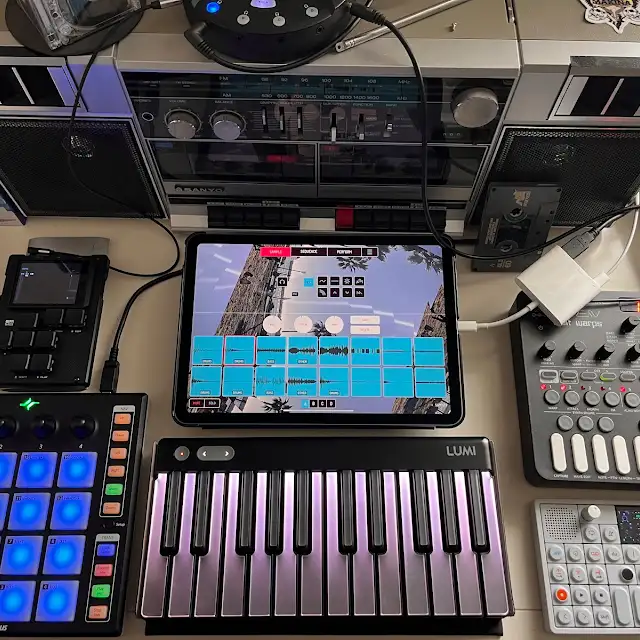
  • My iPad music production studio setup

    IPADLOOPS GEAR PICKS

    Make Music. Make More.

    Discover the gear I recommend for making music with iPad. Controllers, interfaces, headphones and more.

    SHOP MY AMAZON PICKS →

    As an Amazon Associate I earn from qualifying purchases.

  • Archives