PixiTracker 1BIT is a simple and fun tool to quickly create musical sketches, chip tunes and experiments with TRUE 1-BIT SOUND (like on old microcomputers). No musical knowledge required. Perfect for producing Chiptune and Glitch music.
What’s New in Version 1.1
* Audiobus and JACK support;
* additional audio/gfx settings in the Main Menu -> Preferences -> Audio & Graphics;
* additional background images (Main Menu -> Preferences -> Background);
* now you can play any loaded WAV sound with its original speed on the first note of the 6th octave;
* bugs fixed.
[ Key features ]
• true 1-bit sound: only 1 and 0 in the final mix;
• pattern based sequencer (tracker);
• max number of tracks: 12; max number of steps: 64;
• MIDI keyboard support;
• several packs with unique sounds;
• mic/line-in sound recording;
• Wi-Fi export/import;
• export to WAV;
• audio copy/paste;
• iTunes File Sharing;
• warm pixel interface
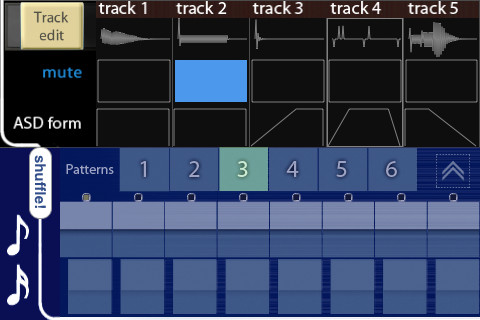
Click Space is some kind of a glitch 5 track groovebox. Each track has assignable volume, pan, gate, speed (pitch), attack, and decay times.
Features:
25 samples.
Audio Copy/Paste.
Sample looping.
Pattern switch.
Master effect unit with LP distortion, digital lofi effect, and a short delay.
Click Space Screenshot
The interesting thing (which differs this app from other grooveboxes) is shuffle editor. You may define overall shuffling patterns in addition to common beat patterns. So you could make some jazzy grace notes and non straight beats. There is a bit of automation for pitch. You can use variation to bring more life into your beat sequence.
The word “lite” means it has NO RECORDING (only pattern saving) and song editor yet.
Glitchbreaks is an iOS Universal manipulation tool for “Glitching” breakbeats. Manipulate beats to create new beats and record them. Good for beat slicing and creating complextro loops.
Glitchbreaks uses four audio channels setup like mute groups. You can quickly switch between them to construct new beats, or manipulate loop points to “Cut” or “Glitch” the breaks.
NEW FEATURES!
Glitch Pad – Made it more dynamic, now it glitches where the waveform is, and moving your finger changes the index.
Loop Modulation – Now it locks into the loop start, instead of letting the waveform play to catch up, also if you set loop start to the very end it will not cross over anymore.
An option to turn off Loop Modulation latching was also added.
Index Tracking – now when you Glitch, Cut, Loop Mod, or Reverse it remembers where you started, and when you are done, it drops you to where the sample would have played to on it’s own, making it so these functions do not take the sample off time.
Now supports Background Audio and mixing with other apps.
Included in the factory sound set are 110 high quality loops.
Sample trigger pads now work with quantize
Re-trigger of Sample pads
Sample audio preview in file browser
Configuration saving for the options menu
Optimization of math routines 5-8 times less CPU usage
Quantize Toggle
Removed BPM restriction
Glitchbreaks can be used as a performance tool to juggle breaksbeats or destroy sounds at a granular level. You can make interesting effect-like-sounds by manipulating pitch, loop start, length, and cutting the beats with fluid responsive controls.
You can record your performance and bring it into iTunes through file sharing, or copy it out into another iOS application via Audio Copy and Paste. You pre determine the length of your recording by bars to easily make pieces to bring into a song without the need for further sample editing.
Auto-BPM detection will detect the tempo of a sample you copy into Glitchbreaks (you just need to specify the bars between 1-4). You can turn this feature off in order to manipulate audio that doesn’t have tempo, this is especially useful for manipulating voice samples.
Glitchbreaks contains a 4 channel mixer to adjust the levels of each sample, as you change the levels the sounds are combined into the mix, on the iPad version this is displayed graphically with a rendered waveform that is combined to give you an indication of what the entire sound looks like.
All of this is very easy to operate and even a beginner will be glitching and juggling breaks like a pro in minutes.
Features :
✔ 90 high quality factory beat loops
✔ Audio Copy and Paste and General Pasteboard support
✔ 4 continuous looping channels with 4 channel mixer
✔ Auto-BPM detection / with on/off setting
✔ Set the BPM up to 2.9 times the original sample BPM
✔ Waveform Display with accurate position indicator (iPad only)
✔ XY-Pad Loop Modulation (Loop Length, Loop Start)
✔ Cut Editor / Sequencer with 4 user save slots
✔ XY-Pads for selecting 4 Glitch or Cut styles
✔ Pitch Shift
✔ Pitch Reset
✔ Independent time settings Whole, Half, Quarter
✔ Quantize for Cut and Glitch operations
✔ Recording to 44.1khz 16bit Wav files
✔ Set custom record length in bars
✔ iTunes File Sharing
✔ Mute
✔ Reverse
✔ Mixer view with volume faders per channel.
✔ Master volume
✔ Universal app
✔ Supports the New iPad retina display / iPhone retina display
✔ Load sounds while playing without hitting stop
Glitchbreaks is available for $4.99
iPad Loops is a blog site dedicated to exposing the best iPad apps for music producers and Djs. This is not a database of every app. It is, however, one of useful recommendations from someone with many years in music production. I try to update it on a daily basis (ok sometimes every two days) and I do my best to post useful apps only. My name is Jason Donnelly (Dj Puzzle). I am THE go to man for royalty free loops. My work is published by Sony Creative, Loopmasters, Acoustica, Xmix, Sound Trends, and many more. Subscribe to our RSS feed below to get updated when new apps are posted.